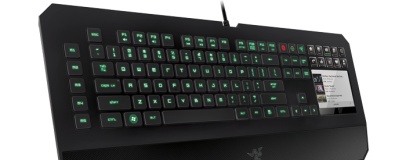
The Razer Deathstalker Ultimate takes the Switchblade UI - OLED-based macro keys and a touch-sensitive LCD - to the peripherals market for the first time.
Gaming peripherals specialist Razer has announced a new keyboard for those with a hefty budget, borrowing technology from its Blade laptop line: the Deathstalker Ultimate.
At its heart, the Deathstalker Ultimate is a fairly standard gaming keyboard with all the usual features including macro keys with cloud-based configuration storage, adjustable backlighting on all keys, 1,000Hz ultrapolling and a dedicated gaming mode.
Where the keyboard differs from the norm, however, is on the right hand side where a number pad would normally be found. Instead of the tenkey layout, gamers will find a 4.05-inch touch-sensitive display and ten tactile OLED-based keys, both fully customisable.
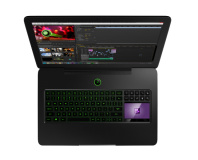
Originally developed for the Switchblade gaming hand-held and later released to market in the Razer Blade gaming laptop, the system allows for an impressive level of customisation not normally available to gamers. While clearly borrowed from the famous Optimus line of
OLED-based customisable keyboards, the Deathstalker Ultimate is nevertheless an interesting product - and the touch-sensitive LCD below the Optimus-like OLED buttons provides another level of customisation and control.
The Switchblade User Interface - to give the system its proper title - comes complete with support for a number of games and seperate application widgets, including multimedia playback control. The system is designed to be used as both an input device - with full gesture-based multi-touch supported on the screen - and a secondary information window.
Sadly, all this functionality comes at a cost: Razer has confirmed plans to launch the Deathstalker Ultimate in the US with a $250 price tag, equivalent to around £159 excluding taxes here in the UK. While that's a significant discount over the $1,500 launch price of the Optimus, it remains to be seen how many gamers take up Razer's offer of a high-priced keyboard.
More information is available on the
official Razer website.

22 Comments
Discuss in the forums Replynope. multi touch would put this thing at 400 im sure :-/
I still think the keyboard on my old hp laptop is the best keyboard I have ever used. Having said that, I have never tried a mechanical one yet, so I'm not sure how it compares :)
I type about 15wpm on any keyboard :D
http://img.tapatalk.com/6d99aeb3-1c61-158b.jpg
CLACK CLACK CLACK CLACK CLACK
For the macro keys with little displays, it's the same problem I have with backlighting: you have to look away from the monitor to use it, which is never ideal particularly when gaming. If you're really into gaming (as I hope you would be if you're spending this much on a gaming keyboard) you likely can touch type and will be capable of memorizing what each of your macro keys do without a little picture to remind you each time. Additionally, the placement is akward at best. It's incredibly far over for left handed use and right handed use has the obvious downside of having to stop using your mouse. Surely you would want to bind all of the standard letter and number keys before going over the numpad area.
The touch screen is even more awkward. Good luck with left handed use, that thing screams right hand which means every time you think of using it you have to consider if it's worth letting go of your mouse for. Media control? Mumble/TS control? System information display? Since you have to pause whatever you're doing and move your mouse hand over it's not exactly much better than simply tabbing to the program in question and controlling it with your mouse. Or, for information display, simply buying a cheap second monitor considering the cost of this keyboard.
The one application where I can see this keyboard really coming into its own is keyboard only games, which are fairly rare. Some games like MMOs can be fairly effectively controlled with just a keyboard and having two hands on the board means easy access to every single key, including the ones on the right which a board like this emphasizes.
Seriously though, looks cool, but way too gimmicky and expensive. Release the touchscreen as an add on for $70 and call it a day.
Ordering two of these.
S*D
Arachnids
Are you just a fanboy or do you actually like their peripherals? What setup have you got at the moment?
And I know you were probably joking, but just to clarify; If Razer did actually manufacture their own monitors, they would have fewer Razer components in them than any other peripheral they make. At best, the blue (or green?) accent lighting of the monitor would be done with Razer components, the rest would be Samsung, Phillips or Panasonic (or any other panel & electronics manufacturer) hardware.
I might get one of these boards to try. I do like chiclet keyboards, so this might suit me quite well. I'd only use it on my gaming rig though, I don't think I could deal with it on my main workstation for every day typing tasks.