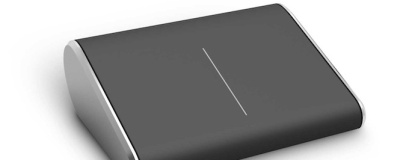
Microsoft's Wedge mouse is an extremely odd design, but should be popular thanks to its pocketable dimensions.
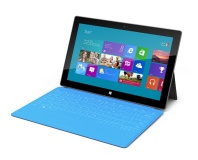
Microsoft's hardware division is working overtime ahead of the launch of Windows 8: not only has it produced the Surface tablets and their clever keyboard-cum-cover, but it has just taken the wraps off a series of new mice and keyboards.
Back on familiar ground - Microsoft has a far longer history producing input devices than any other form of hardware - the Wedge Mobile Keyboard and Wedge Touch Mouse are, as the names possibly suggest, designed for use with the Surface for Windows 8 or Surface for Windows RT tablet devices. Connecting via Bluetooth, they provide a more classical keyboard feel and a fully-fledged traditional pointing device for Microsoft's latest attempt to stem the threat from Apple.
The Wedge Keyboard is designed to be as portable as possible, with a bare-bones tenkeyless design that includes special shortcut keys for the Metro UI. A hinged cover protects the keyboard in transit - and, cleverly, also turns it off to save power when covered - and doubles as an adjustable stand for tablets when the integral kickstand of the Surface design just isn't enough. Unlike the keyboard that comes bundled with the Surface tablets, the Wedge Keyboard has keys that feature laptop-style travel for a more comfortable experience.
The same, sadly, cannot be said of the Wedge Mouse. While it's true that it's one of the smallest and most portable mice around, its door-stop design is likely to be divisive - although the touch-sensitive surface doubling as a four-way touch scrolling trackpad may help alleviate concerns over the design.
For traditionalists, the Sculpt Mobile Keyboard and Sculpt Touch Mouse may be a better choice. The keyboard is based on the design of the Microsoft Comfort Curve Keyboard, and is again a tenkeyless layout designed for portability. Although it doesn't feature the same battery-saving cover of the Wedge, the Sculpt does go to sleep if unused for a period of time only to wake at the push of a button.
The Sculpt Touch Mouse continues the traditional design, looking far more like a traditional digital rodent than the Wedge, but including a four-way touch-strip in place of the traditional mousewheel. Unlike the Wedge, however, BlueTrack technology isn't included - meaning the optical system needs a cleaner surface than the Wedge.
Finally, the company announced plans to offer a firmware update to owners of its Microsoft Touch Mouse which will add Windows 8-specific multi-touch control features including two-finger swiping to switch apps and swiping from the right-hand edge of the mouse to instantly display the Charms menu.
UK pricing has yet to be confirmed, with Microsoft suggesting US RRPs of $79.95 and $69.95 for the Wedge keyboard and mouse respectively and $49.95 each for the Sculpt keyboard and mouse. Pictures of all the new peripherals are available on the
Microsoft website.

36 Comments
Discuss in the forums ReplyI'm glad I just ordered a rat 9 mouse and when budget allows a cyborg v7 keyboard - Proper designs made more functional ! not this dodgy looking gimmick.
RAT 9 and Cyborg V7...
Oh the irony :p
Those are standard designs with added usefulness. Not like an uncomfy looking mouse with a touchpad surface ! I mean can you imagine trying to push that thing around a desk ? admittedly a mechanical keyboard might be better than a V7 but that would be waaay out of my budget and I've never tried one to see the difference.
All their marketing materials and fact sheets detail how attractive it is rather than how ergonomic it is, so they're not doing this because it's a natural evolution - they're doing it because... er... someone help me.
OH COME ON!!!
lol, now we know what microsoft thinks of us ! a bunch of wan*ers.
/me goes back to read the entire article.
Considering how much I hate MS, I'm actually pretty interested to see the keyboard. The mouse seems interesting too but I don't find it to be a stupid product. I've always liked MS input and media devices, especially considering that some of the more quirky ones work better in linux than they do in Windows.
EDIT: Yep...
http://cdn3.sbnation.com/entry_photo_images/4842952/005WTM_SoftTouch_ABack3_FY12_gallery_post.jpg
Get a AA battery in front of you, and if you are some imagination, you can image this very small mouse at the tip of your finger tip.
The mouse has Microsoft Bluetrack technology sensor, so it works any surface no problem.
It's like the Logitech Cube mouse:
http://www.logitech.com/assets/41964/8/cube-icon-images.png
http://www.logitech.com/assets/41807/cube-mouse-gallary-3-black.png
You don't play games with it, you don't start drawing with it. You don't do any extended work. It's just when you want to use a mouse for a moment.
Anyway, here are some additional pictures:
http://cdn3.sbnation.com/entry_photo_images/4842882/001WMK_wFlatCover_gallery_post.jpg
http://cdn0.sbnation.com/entry_photo_images/4842883/008WMK_CoverBent_gallery_post.jpg
The cover protects your tablet from being scratch by the keyboard.. and the cover is also used as a stand for your tablet.
http://cdn2.sbnation.com/entry_photo_images/4842990/002WMK_WaferCoverSlateSide_v1_large_verge_medium_landscape.jpg
Actually Microsoft does make their own keyboard and mouse. If you open a recent keyboard and mouse, you'll see "Microsoft" on all circuit board(s). Also, unlike Dell/HP/Lenovo mouse, where Logitech SetPoint software work with them, as they ARE Logitech mouses. For Microsoft it's not the case. It only works with Microsoft own software, as they are the ones making it.
The Verge did a little tour at Microsoft model shop for peripheral design.
1xZyF7l5_8w
http://www.scan.co.uk/products/steelseries-6g-v2-gaming-keyboard-mechanical-cherry-switch?utm_source=google+shopping&utm_medium=google+shopping
Microsoft... what are you thinking?!
MS might as well just come out and say it, "Metro, it's crap for desktops"
I think you need some sleep, as what you just said made no sense what's so ever, and don't connect in any way.
Actually, it did. There was an article here just last week about MS bringing back the Light Pen. And that wedge mouse looks terrible, but I'm not a claw-grip sort. Also, I hate touchpads. And small mice.
Then again, I have no plans to install Win8, so I'll have no need for a touchpad.
I used laptop mouse. The best I found is the Logitech VX nano. It's nothing like my desktop mouse due to it's small size. Do I care? No! Why? Because I don't do long work, or play games with my laptop. If I did, I would get a desktop mouse. This is for casual usage. Like using Office here and there.
I guess you prefer the red mouse point from Lenovo keyboard.
No, no one has used this mouse. But people have hands which interact a huge amount of objects on a daily basis. We have used various other mice as well. We should have a reasonable intuition on an objects comfort by looking at it. I can't imagine how to even grip that device. The wedge shape would mean a really awkward pincer grip between the thumb and ring finger
A mouse that shape is just never going to be comfortable to use for any period of time and its small size won't add to its comfort. However if they just made it into a stationary touch pad like you get on a laptop it would be small, comfortable to use and effective enough to complete most tasks that you need a mouse for.
For me, I see perfectly how to hold it. in fact, with all the laptop mouse I used, you are forced in a claw grip. So in any case, you don't touch the area that is supposed to be for your palm, but isn't. Microsoft just cut that part out.. that no one uses... to make the mouse more compact.
You hold the mouse in a claw grip position, where you thumb and ring finger hold the mouse on the side, where, at the about, the battery compartment is , and you have your index, and long finger on mouse button area/touchpad. Get a laptop mouse, and see how your hands are put, and you'll see that Microsoft design makes sense.
It's strange that no one complained about Logitech cube mouse. I guess its a curse that Microsoft has.
The logitech is also rubbish. It only allows one finger operation. The pincer grip looks awkward, again it's too small to use comfortably.
A touch pad doesn't live up to the accuracy of a mouse. But I can easily operate a computer at a similar speed with a touch pad as I do with a mouse. But as you say with this mouse
a touchpad would more than suffice for what little mousing activities are left.
http://forums.bit-tech.net/picture.php?albumid=2029&pictureid=28555
When the ring finger and thumb are brought together they meet at quite an acute angle to the index finger highlighted along the black line. The wedge mouse would require the thumb and ring finger to pinch along the red line this leads to an awkward and unergonomic grip since it's more natural for the ring finger to be more forward of the thumb while the middle and index finger are pointing forward
No you can't game with a touchpad. In fact its one of the few things you can't do with any reasonable effectiveness on a touchpad. That said if you're going to game you're not really going to use anything other than a proper mouse.
I'm not saying a touchpad is better than a mouse. I'm saying its better than a mouse that forces unergonomic grips.
You have to admit that ergonomics have been cast a side to make way for aesthetics in the wedge mouse.
What I am saying is that the ergonomic of the laptop mouses is 100% useless. as you don't place your palm (unless you have kids hands). Microsoft made a smaller circuit, and wanted a smaller mouse. So they made this mouse. Simple. They remove what you don't use. It might not LOOK ergonomic. But it's not like you are using any of the other part of the mouse.
You can't just throw ergonomics out the window because you don't use the palm! Your fingers follow a natural path to grip an object. When they are forced away from this natural path it can become uncomfortable.
http://www.theverge.com/2012/8/24/3265121/microsoft-wedge-touch-mouse-and-mobile-keyboard-review
It's down side is just missing features, but overall, good product, and you can see from the picture, it's a claw grip mouse, as I was saying, like laptop mouses.
Yeah maybe you're right...
All that for just $70...
Logitech laptop mouse are 90$. Bigger (still claw grip), has back and forth buttons thaugh, no Bluetooth, uses 2.5Ghz wireless adapter.
[edit]Ignore that, Logitech drop the price of their mouse to 60$[/edit]