Microsoft is reportedly looking to bring back the light pen in order to convince non-touch-screen users of the benefits to Metro UI.
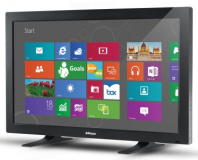
Microsoft's current focus on touch-display interaction - as evidenced by its pushing of Metro UI in Windows 8 and its Surface interactive tables and Windows-based tablet product lines - is clear, but it looks like the company has another trick up its sleeve: the reintroduction of the light pen.
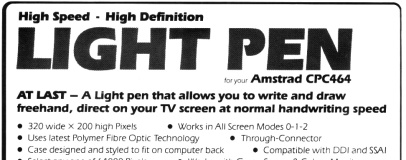
A popular accessory in the eight-bit microcomputing era, the light pen as a product dates back to 1950s and the Whirlwind real-time computer system developed by the Massachusetts Institute of Technology for the US Navy. Its operation was simple: long before the idea of a mouse, it allowed the user to interact with a computer simply by pointing and clicking on the screen.
A light pen typically takes the form of a stylus which contains a small photoreceptor in its tip. This stylus tracks the light emitted by activated phosphor on a cathode-ray tube display - although later models work with liquid-crystal displays too - in order to figure out where on the screen the user is pointing. Using the light pen, an operator could quickly highlight large areas of text for modification and even - in later implementations - draw freehand.
light pens have largely disappeared thanks to the advent of various touch-sensitive overlay technologies which quickly add capacitive or resistive touch-detection capabilities to devices like tablets and mobile phones. Unlike a light pen, a touch-sensitive screen is typically operated using your fingertip or a cheap plastic stylus.
The downside of the current state of the art in touch-sensitivity should be obvious: it's near-impossible to add touch sensitivity to an existing desktop or laptop computer without replacing the display. Although add-on overlays do exist, these typically require dismantling the surround of the display - not something your average user feels particularly comfortable doing.
Faced with an operating system clearly designed to be prodded but an embarrassment of non-proddable computers on the market, Microsoft has apparently decided to bring back the light pen - a simple add-on device which can bring pen control to any computer or laptop on the market today.
According to
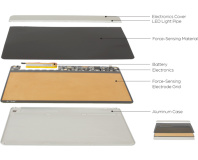
Technology Review, which claims that Microsoft has not yet decided whether or not it will actually release the gadget, the system works by using a side-looking camera to peer at the display and read positioning information encoded in the blue pixels - blue being chosen to minimise the image disruption perceived by the human eye.
While clever, the design - created by Microsoft's Andreas Nowatzyk and Anoop Gupta - does have one drawback: it requires high-resolution image sensors which are currently hard to come by. As a result, the company has yet to decide whether it's worth developing the hardware required to make the reborn light pen a commercial reality.
One thing seems clear, however: Microsoft is doing all it can to ensure that Metro UI on the desktop is a success.

24 Comments
Discuss in the forums ReplycB1gPx7niEA
You know... I am using Windows 8 on my 24inch screen, and I like very much the start screen. I am starting to prefer it over the Start Menu. All you have to do, is add folders to it, and organize the layout and make groups, and you are set for a comfortable experience.
[OFF TOPIC]
I'd like to see a more structured way of deploying the front end to the OS - actually split out the front end from the engine room and give the users some choice, as well as eliminating this bull$s1t approach to OS's of copying the competitor, but worse, while simultaneously ignoring and thus alienating the existing user base.
[OFF TOPIC/]
I'd love to see a light pen, be great if it could capture the functionality of this too:
http://www.alibaba.com/product-gs/346983145/Digital_handwriting_mouse_pen_handwriting_capture.html
Turns out it still exists, too: Litestep.net. Almost makes me wish I still had a working Windows install, then I could see if it's changed over the years.
Or just don't bother and use the type-to-search that they introduced in Win7. It still works like a dream, and with the whole screen for results it's faster than ever to use in Win8
So, essentially, how Linux does it.
X11 (or is it Xorg now?) is the drawing system. On top of that you have your "Window manager", which actually provides the window decoration, movement, resizing and other parts.
How difficult is it to tweak the Metro UI so it's easier to use with the mouse? Surely that's got to be better than reinventing the wheel with a horrible kludge to force people to do something which they have already decided that they're not going to like (whether or not they've actually tried the Win8 preview)?
I don't think it was designed to be long term use... this is good for small things, and I think this is the idea. Example, you want to write a math formula. Just write it in Windows Math input , and it converts it into a nice text ready to copy as text or image, and past into the software if your choice, like Word, Microsoft Mathematics, MathLab and Maple, among others. Or to draw something small.
Metro is perfectly usable with mouse and keyboard, I am using it now as we speak on my big screen. I am working on my website for my software.
If you guys want to see great Metro apps, check out:
- CBC (Canadian Broadcasting Corp) news
- National Film Board of Canada (all content free.. and no it's not Netflix.. it's more artsy videos)
- Toms Hardware
I am really surprised to see the 2 first one mentioned, on an OS that isn't even released... let alone a governmental agency being high-tech with a very well done, and well very well optimized Metro app.
If you don't have a glossy screen, nor press hard with the pen, you should be good.
They don't work on LCD's
Ditto. People are too quick to dismiss...especially on Bit-Tech. I don't think I'll ever understand why so many people on a tech/pc-enthusiast forum are so resistant to change when they _should_ be the ones on the frontlines championing the latest tech.
In this case, comfort. If I wanted to write on a vertical surface all day, I'd train to be a teacher.
Again, that is not the point of the device.
I am sure Microsoft will market it for projector screen or large TV's, not laptop and desktop.
Watch anybody using a computer these days and you'll very rarely find them looking straight on, at eye level, at their monitor. Most people, in fact, have their screens below eye level and tilted back a little to compensate for this.
I've found, through my own experiments, that by taking this even further and using a monitor that's embedded into a desk, tilted slightly towards the user, is actually superb for many types of work. I have a friend who is currently working on doing this with his main gaming rig. Microsoft's work might just take us in the direction of touchscreen monitors as the norm and, in doing so, we'll see far more monitors being treated as non-portable tablets (that are obviously hooked up to a PC) which will make the likes of Windows 8 and, more importantly, Metro, very good to use.
Just because we're (almost) vertical with our setups now doesn't mean there isn't a better way. Again..people are so resistant to change and rarely look any further down the line than the immediate future.
I'm pretty sure many a teacher didn't want to go near interactive smartboards when they were quite happy using powerpoint slides (or OHPs!), but here we are, in the actual future, and they're the standard in modern education.
In the case of the "light-pen", Goodbytes has hit the nail on the head IMO.
I know, though, quite a few people that have looked at it, seen that Windows 8 is different, and decided that they don't like it without even trying the OS for themselves. You think MS would have learnt with Vista: sheeple don't like change.
Just use a wiimote.
Sent from my GT-I9100 using Tapatalk 2