G.Skill's modular Trident X Series design seems to owe its inspiration to rival Corsair's Dominator GT family.
G.Skill is set to unveil its Ivy Bridge-oriented Trident X Series DDR3 modules, featuring a modular heatsink design which may be familiar to fans of rival Corsair's products.
The G.Skill Trident X Series DDR3-2400MHz modules, described in the company pre-release press information as '
overclocking memory,' supports Intel's latest XMP 1.3 specification - making them an ideal partner for the company's upcoming Ivy Bridge processors. Using the XMP 1.3 profile, the modules run at 10-12-12-31T with a voltage of 1.65V - although G.Skill has indicated the family will include other timings and speeds at launch.
The modules themselves are to be packaged in dual-channel kits offering 8GB or 16GB total memory for the Ivy Bridge platform, while those who are running Intel's current-generation Sandy Bridge-E processors can opt for 16GB or 32GB quad-channel kits.
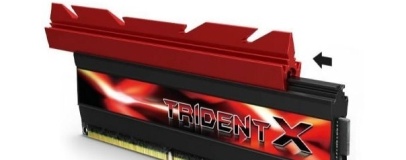
The stand-out feature of the Trident X Series is its modular heatsink design. As well as the main black heatspreader attached to the RAM chips themselves, the modules feature a red heatsink which slides onto the top of the existing heatspreader for improved cooling in cases where vertical clearance over the RAM slots isn't an issue.
It's not an original concept: Corsair's Dominator GT family has offered the same modular heatsink - in the same black-and-red two-tone colour scheme, no less - for quite a while now. Where Corsair's implementation requires three screws to hold the extra sink onto the main heatspreader body, however, G.Skill's version uses a simple sliding mechanism. Whether that translates into less efficient heat transfer remains to be seen.
Update: G.Skill's design still uses screws, it seems. Rather than Corsair's vertical screws, the G.Skill modules use one screw at either end, preventing the upper heatsink block from sliding when you don't want it to. If you want to remove or swap out the upper heatsink, you're still going to have to whip out a screwdriver.
Pricing for the G.Skill Trident X Series is expected to be announced closer to the official launch date of the 4th of May.

21 Comments
Discuss in the forums ReplyAlso:
http://i5.aijaa.com/b/00839/10015253.jpg
Maybe, but :
1) to remove dominator heatsinks, you need hex screwdriver, which is not that common. In case of Vengeance, you don't have that option.
2) at least in my area, lately Corsair RAM modules have relatively high RMA rate.
By the way, G.Skill prices in my country for these new ones :
F3-2400C10D-8GTX (2x4GB TridentX DDR3-2400) - 115,4 euros
F3-2400C10D-16GTX (2x8GB TridentX DDR3-2400) - 226.08 euros
F3-2400C10Q-16GTX (4x4GB TridentX DDR3-2400) - 224.53 euros
F3-2400C10Q-32GTX (4x8GB TridentX DDR3-2400) - 435.13 euros
Now let's see Corsair... Oh wait, Corsair has no DDR3-2400 :D.
Agreed, I feel like sticks of RAM like this are one of the common scams in the computer world, like how Macs are more expensive therefore better. Today's RAM does get pretty hot, but not to the point that qualifies for a large heatsink.
I personally don't see how you can make a stick of memory perform better on 1 specific type of CPU. I could sort of understand chipset, but not CPU. To me, that's like saying a company designs an expensive trailer and says that this trailer works especially well with this 1 specific truck. But how? What makes it so much better? I could see how it might work better with trucks rather than SUVs, but even then, how much of a difference does that make? I'm not just ranting here, I'd really like to know with proven facts - what makes this type of RAM perform better on SB or IB rather than anything else?
Aside from the "performance RAM" that targets a specific CPU, I also don't understand how people honestly think they're so much better. Yes, they can overclock a lot, but at the cost of latency. There's a point where frequency doesn't matter, but latency always has room for improvement (until you reach 0ns). I realize today that latency is becoming less important, but this kind of memory has been around since latency was more important than frequency.
http://www.gskill.com/products.php?index=511&c1=&c2=
Thanks for the input. But, wouldn't this performance difference be nearly insignificant? I feel like at best you'd get 1FPS higher in a game or some sort of rendering might be a few seconds faster.
Remember the memory controller is inside the CPU these days. To *some* extent, you can hang anything at the end of the data trace, but Intel and AMD, believe it or not, tweak their IMC for particular behaviour which may or may not match pretty well with IC type X,Y or Z.... OR.... be a complete mismatch. Sandy Bridge does NOT work well with Elpida Hypers for instance, yet they're awesome on Nehalem/Gulftown.
At the end of the day, It all comes down to not the BIOS, but the CPU. It IS possible to tweak the BIOS so the sticks work, but often there are hidden latencies that have to be increased to make it work, so while you might still have 1066MHz on paper, the performance is in the toilet.
So, to couple that to the "designed for CPU X" PR comment... the SPD can be tweaked here and there, but really, the RAM just uses an IC that's been well tested in their lab and works well on IMCs A,B and C
It is not about performance, but about compatibility, if we talk about these "Ivy Bridge" TridentX, "Sandy Bridge-E" RipjawZ or "Sandy Bridge" RipjawX memory modules - that is why you got supported motherboard list for every module.
Speed is another issue - yes, the effect is very small, that is why i still use DDR3-1333 CL7 :D.
Can we expect a Bit tech review of this? I'm sure most of us here would like to see if there's actually a difference, or if that difference actually matters.
Any memory can be converted to low profile. I have/had some Vengeance ram that I needed to fit under a Noctua NH-D14, so I pried the heatsink off and replaced with some copper ramsinks. Then clocked them as high as the motherboard would allow (which is only 1866 for that board and memory). It still runs perfectly, in my Llano build that I use mainly for browsing and working.
Wave goodbye to your RAM module warranty, because it left the building.
Also, is there any point in ram-sinks? Easy to test*, just pick up some RAM with a heat spreader, see how high it will clock (and take temeratures), then pry the heatsink off and test again.
*if you can afford to bork some RAM.
Ram only takes like 5 watts running - there is little chance that any heat sink is going to be worth the extra cost (if any).
It works with the large heatsink-extension. It also works without it.
Why is it there then?