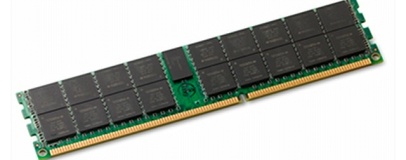
Invensas' multi face down (xFD) packaging technology promises cheaper, faster and larger memory modules.
Invensas has announced that it will be unveiling its latest breakthroughs in multi-die dynamic memory (DRAM) packagaging at the International Symposium on Quality Electronic Design later this week.
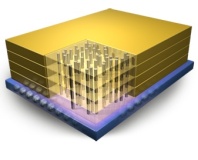
Invensas' xFD technology, which will form the heart of the presentation by the company's vice president and chief technologist Richard Crisp, promises much: using multi face down packaging, xFD DRAM modules feature a separated data line for each die in the package. The result, Invensas claims, is a multi-die package with single-die performance in an ultra-thin profile.
Using xFD, Invensas claims that memory makers can cram two DRAM dies into the same footprint of a single die thanks to a reduction in thickness of 30 per cent. The use of ultra-short separated interconnects, meanwhile, boosts performance to that of single-die packages. Finally, reduced material costs and a parallel process flow for manufacturing means that xFD modules are significantly cheaper than alternative multi-die packaging technologies.
Invensas' xFD isn't the only solution to the need for growing component density, of course. It competes directly with through-silicon via (TSV) techniques, but Invensas claims xFD has a key advantage: as it uses the existing wire-bond manufacturing infrastructure, it's easy for manufacturers to adopt with little risk.
Currently, Invensas is targeting the data centre with its Dual Face Down (DFD) and Quad Face Down (QFD) technologies, promising significantly increased memory density for server applications. The technology has promise in other areas, however: mobile manufacturers can use the 30 per cent footprint shrink over competing packaging technologies to increase the size of the device's battery or reduce the overall dimensions, while overclockers will be pleased to hear about the improved heat dissipation characteristics offered by xFD.
Thus far, however, Invensas has yet score a big deal with a memory manufacturer to implement the xFD packaging technology in a mainstream product. The closest the company has come is a deal with bit-player memory maker Nanium in October last year. Should Crisp prove persuasive during his presentation at ISQED, that could change - and if xFD lives up to the company's claims, it's like to be a change for the better.

27 Comments
Discuss in the forums ReplyI hadn't seen that. Now, what has been seen cannot be un-seen...
not true at all, i'm not really sure what the limit is on triple-channel but on dual channel, once you reach 12gb you actually start to slow down your computer. i'm guessing triple channel would start slowing down at 18gb, which is more than enough for anybody (even 12 is unnecessary).
sure ram is relatively cheap these days but ever since windows vista came out, people started to act like 3gb should be the bare minimum, and some people seem to find 2gb to be incredibly small. being a linux user, i'm amazed how little MS is doing about this memory problem. on my netbook, i could get away with using 512mb and i'd have to TRY using up that much. windows 7 64 bit will use up that much before you reach the desktop, even when turning off things like prefetching. what a waste.
There are three upshots from this:
1) More memory is always better for performance
2) Unused memory is wasted memory
3) Don't try to second-guess the kernel's memory management system
You obviously didn't read my post accurately - I explicitly mentioned Windows is so memory consuming with prefetching OFF.
1. As I also mentioned before, no, it isn't. If you use more than your memory controller can handle (such as 12GB on dual channel) then you start to lose performance, I can find proof for that if you like. But even in a triple-channel memory system, lets say you have 16GB and all you're doing is playing 1 game after booting the computer. Having that much RAM is not going to improve your performance AT ALL if you're not even using 4GB, including buffers, cache, ramdisks, etc. The amount of RAM you have can only make your system less slow, it cannot improve performance beyond a certain point - this has also been proven.
2. I agree, but bloated programs also waste memory. Lets use file browsers for example. Lets say we have 2 file browsers with generally all the same features and both are proven to be stable. Program A uses 75MB of RAM when operating. Program B uses 25MB. Whether you prefetch those programs or not, you're still wasting memory on program A. Program A might be a little more flashy looking, but for someone like me, I'd rather use something that is functional rather than pretty. Besides, the more memory a program consumes, technically speaking, the slower it will be to load and to operate (even if it is on a nanoscopic level).
This is exactly what my problem is with Windows - the actual memory in use by software. Linux will use up 100% of RAM for caching - I don't have a problem with prefetching or caching. What I have a problem with is the bloated code. It also ends up with more HDD usage, which in turn causes slower load times.
Using bloated software that takes a long time to load and is more memory consuming isn't worth using over something just as good (maybe better) that has a smaller footprint. Just because you have the capacity it doesn't mean you're REQUIRED fill it. You could just simply pay less for a lower capacity if its THAT big of a deal to you to fill it all up.
3. I never did, don't second-guess me by thinking I'm just making things up.
If you find this disagreeable then you're probably too wealthy to see that there's a fine line between function and efficiency. Again, I'm not saying caching or prefetching is inefficient, because it is efficient. Its the programs themselves that Windows prefetch that are inefficient.
The only way I could, in a remote way, see having more RAM resulting in a slowdown is the fact that as you get to larger module sizes they tend to have looser timings and if you're into over-clocking unless you're willing to drop large sums of money (things which tend to go hand-in-hand) the modules *can* have a slower timing.
I work in the VFX industry and we have had tests where a composite might finish a few seconds faster on a system with less RAM on it, since the additional isn't required but there is no benefit of having half your render farm with reduced RAM to shave off a few seconds but then are unable to do any of the large FX renders because of the reduced RAM. We have 24GB workstations, 48GB render nodes. Oh, and we run Linux.
There's a reason with SSDs it would be better if they could communicate directly with the BUS rather than going through SATA3/PCIe - they would be able to run faster and run more like system RAM. It will happen in our lifetimes, and it will be amazing.
But there are a fair number of areas where software eats both CPU cycles and RAM for breakfast and then demands more. And more. And more.
That's where this is going to be advantageous... which is good, as it'll probably be exorbitantly expensive for the first couple of generations anyway!
I was mostly referring to home PCs, I'm aware that even 24GB is small (in some cases, tiny) for servers or supercomputers. I believe you might be correct in your assumption, but I think it also has something to do with the memory controller being unable to address RAM efficiently to a certain level. Think of it like playing a guitar - people are able to play 6-strings, 8-strings, and even 12-strings, but there's only so much your 1 hand can do until it becomes too difficult. So I like to think of memory controllers as hands and the amount of memory as the strings. If you've got 3 hands, you can play 12 strings a lot easier than you could with 2.
@Paradgim Shifter
I agree, but this is exactly my complaint - software these days acts like it owns your entire computer, when I've seen plenty of alternatives that do the same thing much more efficiently. If I didn't see the alternatives, then I wouldn't complain because that would mean that its really time to move on. Yes, I'm sure some day 4GB will be seen as a small amount but RAM isn't multiplying in size so much anymore, but VRAM is which I think is great.
Not sure how I installed and happily ran Win7 x64 with Opera on my ancient Acer Aspire 1 ZG5 - yeah, the 8GB SuperSlowDisk with 512MB RAM Linpus-based one
Also, you try running 7 odd browsers, 3-5 virtual machines and half the Adobe CS5.5 apps at the same time - even 12GB RAM starts feeling a little tight then. Just try throwing around 24mp RAW files in your 512MB RAM linux system and see how quickly you think "640kb memory should be enough for anyone"! Oh sorry, wrong person ;)
Even from a home point of view there's several games that benefit from more than 4GB RAM. Hell, if you're a heavy web user, there's several BROWSERS that benefit from more than 4GB RAM! Basically, once you start moving beyond single tasking, it's well worth having more memory, even in Linux - which you wouldn't be running on a "home computer" ;)
Written from my 12GB RAM Windows 7 machine.
Yeah, like the average person really does that. No offense but unless you have a GOOD reason to do all those things at once, it'd be a lot more logical and efficient and cost effective if you just didn't multitask to that level. Unless you have at least 6 monitors and at least 3 sets of mice and keyboard, you or anyone else is not going to be actively operating all those tasks at the same time, and I'm getting the impression that many of those things you mentioned are not related. For example, if you've got 3 virtual machines out, chances are they don't have any significant immediate relation to your Adobe programs. Yes, your 12GB might help you do all that but multitasking to the point where you can't even see half of what you're doing is completely pointless. If you're doing it to save time from loading things, you can still do a VM snapshot or save a browser session.
True, but nearly every game doesn't NEED more than 4GB, especially if you're not a multitasking fiend. As of right now, firefox is the only severely memory bloated browser. And browsers are no different than your previous scenario - realistically, nobody is going to have 30+ tabs open at a time in an everyday situation.
I agree with the fact that more memory means better multitasking, but there is definetly such thing as running too much at a time.
Mate, anyone who knows that it's all about the Pentiums is awesome.
I have to say though, I'm with [-Stash-] when it comes to multitasking. I frequently run two different browsers, a media player, steam, a text editor with ~10 different files open, a virtual machine, and a host of desktop mods. all of which I leave open when I feel like playing a game. I could make do with 2gb of memory if i really wanted to, but then I would have to go about losing all my programs whenever I needed to do something RAM intensive, and re-open them when I'm done. Or I could spend a little more (key word being little, RAM is super cheap right now), and probably save myself an hour a day. I think my time is worth that much, and I don't think programmers (like myself) need to spend an extra week revising their code to reduce it's memory footprint by 20Mb.
Well, that's your preference and I'm fine with that. I have no problem with eye candy, but I feel like it should be optional. Thats one of the things I like so much about linux - you can customize the overall appearance of things to be really amazing, but you can keep it simple if you want an efficient system. It also has many alternatives, so you aren't forced to be stuck with a big memory footprint like Windows 64 bit. I'm a programmer myself and I care about making my stuff as compatible as possible. I'm working on a large-scale linux-based robot that I intend to be operable within 256MB (the robot itself might come with 512MB). My point is, why fill up all that memory with bloated software when you could use it for something else? I have about 30 services in my windows 7 setup disabled just because I don't use them. In linux, I have maybe 3 disabled, because I only install what I need.
But I need to ask, if the programs are pretched, why is it a big deal to just re-open them? Is sacrificing 1-3 seconds really that big of a deal? You waste time searching for the program in the taskbar too, y'know. To me, I can't handle the cluttered mess of 20 things in my taskbar.
Now switch back and forth a couple of hundred times in a day and things really start to add up. Not to mention, I personally find those few seconds distracting when I'm focusing on a problem or a design.
I'm not all that special, I know plenty of people who use a computer heavily because it is their livelihood. Hell, I even know a writer who mainly uses Word along with Chrome, Adobe Reader and VLC and she keeps hitting the 3GB limit on her 13" laptop because she needs multiple documents and audio files open simultaneously in order to properly research what she's writing about.
At the end of the day, many people use computers in completely different ways. Some of us are special, unique, beautiful snowflakes. Computers can multitask, so why not let them do more at once, so I only have to think about one thing at a time? If I can have all the apps open that I'm going to use that day, why not have them sitting open in memory? Why should I waste my time opening and closing them all day and wasting valuable seconds each time even with an SSD? Have you ever tried encoding 1080 video? 12GB RAM isn't enough for that! Don't believe me?
Final thought but why is it that on every news piece that says "yay, tech's improved again" there's *always* someone who takes the time and effort to post on a tech enthusiast site "bah humbug, I don't see the point of new/faster/bigger/better/cheaper tech what we had five years ago is still fast enough for my use case, so there can't possibly anyone who needs more than me"? I mean seriously isn't it a good thing people? Also, if stuff's good enough for you, great, yay you, give yourself a cookie, but don't tell other people that they don't need it how the hell do you know?
Peace.
P.S. Bit Tech, you trying to drive me to an ad blocker with those &%$ing undertone ad monstrosities?
I'm not an it professional, although I am a designer. A quick look at my taskbar reveals I have :
2 chrome sessions open, each with 30+ tabs,
Firefox with 15+ tabs
Spotify
Thunderbird
Skype
VM running 2(xp) and 1 (98) machines
Photoshop
Inkscape
Open office on 3 documents
Cyberghost VPN
jDownloader
I need RAM, and lots of it. There is no way that I'm going to close and restart each application as use demands. Commutatively over a year I'd loose days.
Just because 4 years ago I'd have thought that I was excessive in my program usage it doesn't make that the case now. Computer use changes and we find new uses and expand into new technology as it becomes available.
P.S. That usage is my typical evening setup. When I'm working during the day it skyrockets even further
For an analogy, thats like saying you like to make chicken pot pies for a living but you want to make cookies for a special occasion, but you feel the need to make a pie when making those cookies, when you already have enough pies. Sure both the pie and cookies go in the oven, but putting them in at the same time is not making your life any easier.
http://www.slate.com/articles/life/the_hive/2010/12/open_this_story_in_a_new_tab.html
Actually, I didn't complain about this new tech, I think its great and something that needed to be done a long time ago. And you're right, people are entitled to do things the way they want. I don't have a problem with you having 12GB, because multimedia and virtualization need it, I'm just saying you could be doing things a lot more efficiently.
I have 25 tabs open right now on my work PC, pretty much do every day, sometimes more when researching things.
Currently using ~1gb of ram for firefox but increases a lot when multiple tabs are running flash. (bad flash, bad!)
Well, let's take my browser for example: I use Chrome for general browsing, my window currently has 16 tabs, pretty average for me. Every time I close and reopen, each of those tabs has to refresh. While this may only take a few seconds, if I were to close this window every time I opened another significant program I might find myself having to wait a few seconds 15 times in an hour. The actual time lost is minimal, but it has the same effect as dropping your pen on the floor 15 times an hour would have; annoying me. Switching windows that are already open takes me almost zero time because I am so used to having the same host of programs open.
My browser eats up about 1gb of RAM right now, so to avoid being slightly annoyed every day all I have to do is buy another gigabyte of RAM, about $10USD. This purchase lasts 2 years; seems worthwhile to me.
Of course, everyone will have their own preferences. You probably work faster because you keep your work-space focused on a single task, I work faster by having many options open to me at once.
lol, could you give a different example? Because web browsers (and I suppose games that make you lose progress when you quit them) are one of very very few programs that tend to be very slow when you restart. I don't blame you at all for wanting to keep your browser open.
On my linux setups, I usually have 3 or 4 workspaces (if you don't know what they are, they're kinda like having multiple monitors but all on 1 screen - great for multitasking). On 1 workspace, I usually have something like pidgin and a web browser open at all times. On another workspace I have a terminal, a file browser, and an IDE open. The 3rd workspace might be a text document I'm working on, software updates, and a calculator. and the 4th I keep open for whatever.
I don't find many of my applications to be worth shutting down, the ones that are (catalyst control center, dropbox, steam, and a few others) all sit in the background and i'm prone to forget them if I close them. So in part I guess I'm just too lazy to be efficient, and when my PC is as fast as it is (pretty darn fast) I don't have much motivation to do so.
In the case of the average user I don't think most people will ever use more than 2gb of RAM when you ignore bloatware and memory leaks, but then again, bloatware and memory leaks are in many ways the topic of discussion here, programs that eat excessive amounts of RAM for no good reason are far too prevalent (I don't want to spend time minimizing the footprint of my code, but letting a runaway data structure through the testing stage is unacceptable), and that's a poor reason to start packing extra ram into PC's.
Well, I'm good, but I'm not that good. I wouldn't be actually editing the video at the same time as those other thing. But I do have to react to client changes very rapidly at times and it's a lot easier if the video is already loaded, cached and in the correct place. Also, rendering of HD video still takes an age, even with the fastest of current tech on a single machine, so that needs to run int eh background whie you can get on with other work. Bring on faster EVERYTHING for video still!
Seen the memory requirements for ZLMA2? I believe that's not isolated to Windows.
Wait what?! I thought you had ti try really hard to fill 512MB. Now I'm just confused.
probably the bit that takes longest is actually getting the files open that you need to be working on to the part you want to be working. If you know you're going to be working on something throughout the day on and off as more information comes through, why keep closing it down and having to go find it again?
Also, how many other programs could you get DOS running in the background while you gamed, if you could convince the swine to free up enough EMS *shudder*? Windows multitasks pretty well. DOS - not so well ;) People used to single task on computers a lot because they sucked at multitasking (or just plain didn't do it!). Nowadays, because the tech's improved, you *can* do more - if you have enough tech. Of course, if you only have a little bit, you have less choice.
Still hypothetical. The "Average" user does not exist. Unless you can show me how to open 3.2 tabs of course ;)
Average again huh? Didn't I mention they don't exist? You realise that your "average" Smartphone now records 1080p video right? And that many, many "average" people post video to YouTube every second? I guess some of these might even be "average" home users... There might also be web designers who do other things, like print, or photography, or video as well as web design. Very few things happen in total isolation, so it's pointless viewing only isolated use cases.
And yeah, if I had a moment to actually think about things I'm sure I could figure out more efficient ways to do things - unfortunately there are times in the real world when you don't have time and you have to make do.
Sweet dreams.