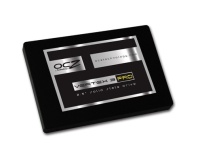
The 32GB Onyx SSD from OCZ Technologies is the company's first to hit the market with an MRSP below $100.
OCZ Technology has announced its first solid-state drive to hit the market below the magic $100 price point - the Onyx.
While the Onyx - a 2.5" SATA II SSD - only offers a somewhat cramped 32GB of storage space, it could be a tempting purchase for those looking to speed up a boot drive or make their ultraportable laptop a bit more robust.
The company claims that while storage space has been trimmed, performance has been kept as high as possible - and while it's unlikely to challenge any of the market leading devices, a read speed of 125MB/s and a 70MB/s write speed certainly isn't anything to complain about. A generous 64MB of on-board cache helps to keep things ticking along, too.
The company's chief executive officer Ryan Petersen claims that the Onyx series - which is expected to grow to encompass larger sizes in the future - "
delivers the speed and reliability of solid state storage to mainstream consumers at an aggressive price point that makes the technology more accessible to customers who want to take advantage of all the benefits of the SSDs without incurring the high cost normally associated with the solution."
OCZ is pretty confident about the long-term benefits of its budget SSD, too: offering a three-year warranty, the company claims that the Onyx series features "
unique performance optimisation to keep the drives at peak performance over the long term" - although it's a trifle cagey with the details of exactly what 'optimisation' it means.
The 32GB Onyx is available to retailers immediately, so expect it to crop up on your favourite hardware sites pretty sharpish.
Can you think of a use for a 'budget' SSD, or is the Onyx still too expensive for a mere 32GB of storage? Share your thoughts over in
the forums.

50 Comments
Discuss in the forums ReplyAnother cheap SSD offering the same or lower performance than a high end HDD at a lower capacity and higher price.
As i`m getting new tech overload and my poor old brain is struggling to keep up with all the shennanigans of firm trimware or trim firmware or ware trimfir or whatever else plagues the SSD market, i opted for the refund.
I`ve only just come to terms with BD, HD, hdmi etc!!
I realise that this is all the fun of the fair for early adopters, but there comes a point where i can't be ar*sed with all the faffing around, so have decided to hand over the bucks when the tech settles down a bit more and stabilises......./flamebait lol
And 30gb?? Way too small, as the wife so often complains...
It's all about access times.
Depends on where you measure from, if you include the time the mainboards wastes before even starting to load the data from whatever kind of storage you use you will have a hard time getting below 40 secs (especially on high end boards with all the latest and greatest stuff and dont even look at raid if you care about boot times measured from the the time you push the power button).
But if you just look at the time it takes to boot from when the system actually starts loading windows no sdd (not even first gen jmicron cr*p) will ever take anything close to 40 secs.
In other words, its naff all to do with hardware, boot times, most of the time.
does this one support TRIM? will there be a OCZ value drive at 128GB or above? im not very happy that this Samsung drive doesn't support TRIM and has this format bug.
my current ssd windows 7 boots in around 35 seconds (intel x-25m)
but its more for access times that ssd rules. load times for games drop in half in places. Thats its true power. Problem with something this small you wont fit anything on it
Anyway, reviews please.
i honestly don't see why none of the desktop users flock to buy SSD. it's the best thing since sliced bread. it is guaranteed to speed up the feel of your system.
speaking of games, i've put GTA4 onto my SSD and since then, i only see 2 or 3 loading images before getting into game, and there is zero blurry texture (streaming texture) even when driving at top speed. (on WD Black, those blurry texture are quite frequent when driving fast, and WD Black is fastest in access time) but yes, you would have to be selective about your games, can't just install Steam folder on the SSD and hope it will fit.
Which controller is in this drive?
All I want to know is: TRIM and what controller?
Probably because for home use the cost of changing to a SSD is hard to justify.
Whilst I would quite like a 128GB SSD as a boot drive on my main Core i7 PC I can't justify the cost, especially when that money could be put to better use changing my laptops HD for a SSD. Even then the extra few seconds it would save are simply not worth the cost (not to mention a massive drop in storage capacity - something critical as my laptop only has room for one HD).
It is too expensive for the capacity
or,
It is too small for the price.
Even just two of them should see read speeds in excess of 300MB/s while giving you more usable space than a single drive.
If I still had a desktop I'd be looking at RAID for sure. :)
Wouldnt a Intel 80GB be better?
I give 2-5 years for that to be trew so I will wait for that day...
Yeah I agree. And also, why we even have to do restart the computer? I myself always put my computer on standby or hibernate whenever I'm finished with it, because it'll save a lot of time, eg. you don't have to wait it to boot, don't have to reopen all of your most used programs, etc. I only do a warm/cold boot maybe once in a week to make it fresh again. It's so simple right? After all, that's what standy/hibernate used for, to save time doing reboot!
I was thinking the same thing.
TBH, I won't even look at an SSD unless its 200+MB/s read
But you are missing the point of the zero access time there, but I accept you might want just one large drive. As soon as you hit the OS all the taskbar apps and gadgets load at once rather than sequentially. Plus, there are advantages to a small drive for just OS, then storage for other means: if you partition a hard drive you have to wait for the heads to fire back and forth should you want to access to partition at once.
75MB write is admittedly not huge, but people with Intel G1 SSDs had similar and people lived with it. The difference is Kingstons 40GB Intel drive had a dire 40MB/s write though and you could really feel it. It's about what you really want from a storage medium: Tbh I resigning myself to maybe get a 2TB green for mass storage as all it has to do is be quiet and SSD for boot/program drive: although I couldn't do with less than a 60GB OS drive, personally. Even 7200RPM drives are "noisy" for me now - my Samsung F1s piss me off.
It will never happen. Mainstream hard drive sizes will always outweigh SSDs by sheer platter capacity alone.
I've got about 10 games installed a few divx videos, that's all.
I just bought an external 500gb hard drive for £45, I would like the speed of an ssd but their too small and expensive at the moment.
You have a good point about the instant access but I still don't believe its worth wasting twice the money on when you could just save up and buy a true SSD (one that provides much more noticeable results [not that any SSD will not provide noticeable results])
My hard drive is the third loudest thing in my PC after my Optical Drive (Sony Optiarc silence my butt :grrr: and my Side Panel fan) - so when I think when I upgrade I might just go for an SSD Boot drive and 5400 rpm drive too
Your PC must be pretty silent then. I can't ever hear my hard drives and my tower is up on the desk next to the monitor. Think my side fan and heatsink fan drown them out. Processor runs hot in this old mobo though..so gotta have heatsink fan on full crack. Thankfully it's a Freezer 7 Pro not an Intel one..or I'd be deaf.
What HSF do you have, I have NEVER heard my CPU fan, literally, I don't know what it sounds like, unless your ear is up against it it's inaudible