SilverStone's recently announced HDDBoost delivers SSD speed for Terabytes of storage.
SilverStone has just announced its
HDDBoost, a device that teams an SSD with a hard disk. The aim is to offer the incredibly fast data access speeds typical of SSDs with the high capacity of a hard disk but to make it easy to use, so both appear as a single storage device in Windows. Essentially, the HDDBoost uses an SSD as an huge cache for your hard disk, theoretically delivering the best of both technologies with no compromise. This sounds almost as magical as the
Lucid Hydra, but with a much better chance of success.
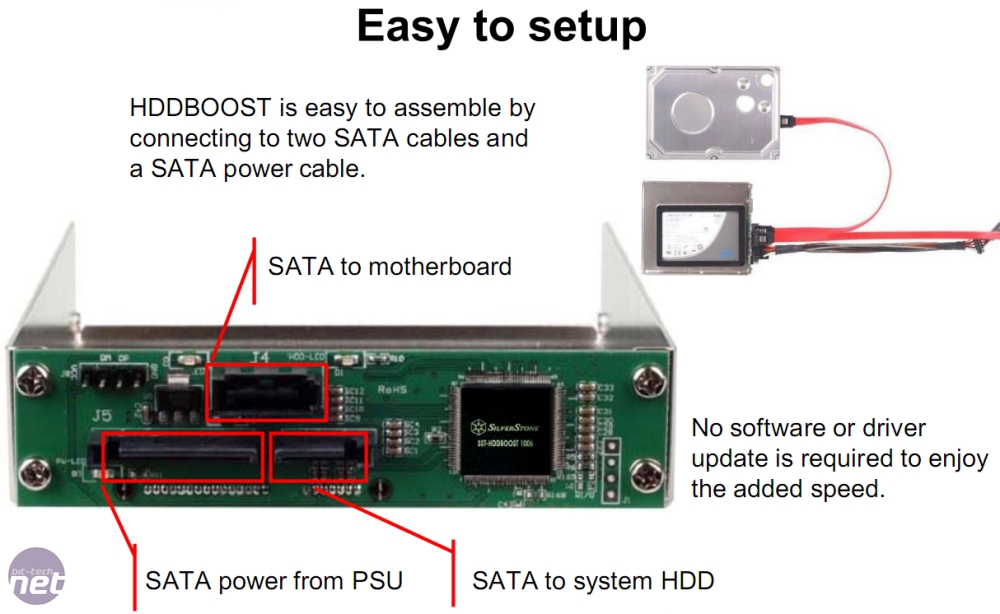
The device takes the form of a 2.5in to 3.5in hard disk caddy with a couple of SATA connectors on the end. These connectors allow you to daisy-chain the hard disk to the SSD, and then connect the caddy to your motherboard. As usual, images are better than words for explaining weird layouts, so here you go:
In order to appear as one storage device in Windows, SilverStone has needed to use some software to con the OS. As soon as you install the HDDBoost, it performs a mirror backup of the most commonly used hard disk files to the SSD.
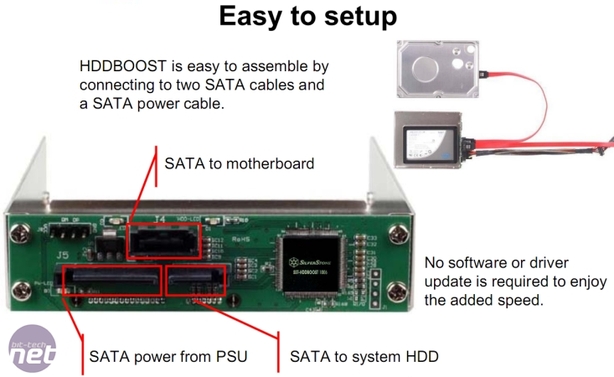
SilverStone’s HDDBoost aims to pair an SSD and hard disk to deliver the best attributes of both devices (that’s speed and loads of storage, just in case you’ve been asleep for the last two years)
In SilverStone’s own words: "
During the first mirror backup process, the HDDBoost will ‘mirror’ the front-end data from the HDD to the SSD directly. Defragmenting the HDD first will ensure there is as much data as possible to be copied to the SSD."
Once the SSD has all the priority data from the hard disk, the HDDBoost storage controller sets the data read priority to the SSD, telling Windows to favour the SSD when possible. This makes the storage sub-system as fast as the SSD, but with all the storage space of the hard disk.
Some software is needed to achieve the magic, but the HDDBoost looks like one of the most innovative yet practical products we’ve seen in ages. It’s due for release on19 February 2010, and set to cost €33 (exc VAT) in Europe. We hope to have one in the Labs for testing soon to see if it all works.
In the meantime, take a look at
SilverStone’s flashy, er, Flash animations of the HDDBoost in action and let us know your thoughts
in the forums.
Update There's confusion as to whether the SSDBoost requires software or not. The above slide from the press release says not, but a subsequent slide from the same release talks about a '
Special Software Utility'. We've asked SilverStone for clarification, but we may need to wait until we get our hands on a sample to know what the situation is. Stay tuned!

47 Comments
Discuss in the forums ReplyAnyone...
This would be an interesting test on a review...
Looks from the article like it's a drop-in upgrade. Can anyone confirm, or are we in clean install territory?
Edit: looks like it is a drop in. If performance improvement hits the 70% range SilverStone suggests, it's a massive winner for €33.
The price certainly seems cheap until you consider how simple the overall concept is and that it could probably be home made for less by any electronics guru's out there.
hopefully Silverstone can prove me wrong.
nope, you can just get the SSD and the kit and use your existing OS hard drive, this will mirror the most used data from the HDD to the SSD and tell the OS to look at the SSD first for the data it needs.
you wont even have to re install the OS if what silverstone say is true.
shame it looks like its windoze only . . . . . id have one if it supported mac or linux.
Many people already have SSD. Some even have SSD in raid mode!
I have a 30gb ssd and at £99 for a fast vertex, they are affordable. Oh and I have mechanical hard disks too!!
But if it works and doesn't need software (bt says it doesn't, Silverstone don't say) then I could see myself using one of these on my primary data drive. My main drive is a 120gb SSD, but a lot of stuff sits on one of my 1tb drives so a "cache" for that would be good.
Search for SSD TRIM in a search engine or wiklipedia and you can read about it. If this somewhat nifty product does not let the microsoft driver recognize the SSD that may be a bad thing. Just something to be aware of - I don't really know the guts of what this product it.
Another thing: if you use this adapter will the Intel SSD toolbox still recognize the SSD? Obviously this is only important if you use an Intel SSD but it could be another issue.
Most users have Windows, then they have files, music & videos. Logic tells me that most would put the Windows OS on the SSD, and put the music, videos and files on the mechanical drive.
So, how is buddying up a 64gig SSD with a 1.5 Terabyte with this device drive gonna speed things up? Movies will still be hosted on the mechanical drive, in which you'll see a slight delay whilst starting the movie, due to the drive spinning up and locating the data.
If anything, I reckon this device would slow down your operating system, as random windows files get squeezed off the SSD and shoved somewhere on the Mechanical drive...
My two cents. :)
Oh, and when you do test these, i'd be mighty interested to see if these can be put in RAID.
"In order to appear as one storage device in Windows, SilverStone has needed to use some software to con the OS."
Image says:
"No software or driver update is required to enjoy the added speed"
Ok then....
Maybe we could be seeing manufacturers ⦠hybrid a SSD / HDD in a single drive, in the near future
On the other hand i think most system builders would be better off using the small cheap SSD for there OS and the 2Tb HDD for everything else.
There's alot of questions i'd like to have answered about this !
So for example without having the software, the device probably follows a simple algorithm that the most recently used data is stored in the SSD, and the oldest stuff is deleted to make room for the new stuff. However, with the software the intelligence increases - so that the *most used* data is stored in the SSD, rather than *most recently* used.
I think it's fantastic - the problem with Intel's version of this is that the cache was way too small. Even with a rudimentary algorithm, given 32-64GB of 'cache' you have a fighting chance that Windows and all of your most used apps will almost permanently be stored on the SSD. Windows boot and all your main apps will load in record times. Your personal files and other files that you only access every so often will be stored on the HD. You basically get the speed boost of an SSD, without the lack of storage space. It's pretty ideal until SSDs become cheaper per GB than a mechanical drive.
I would like to see a version that uses DIMMs instead of SSDs for those people who want insane performance.
You could get a 2TB BHDD for around 200 euro with the speed of a SSD. I will certainly buy one yesterday.
I think that the advantage of this will be not that you can get SSD speeds without reinstalling but rather that it automatically selects the files that get used most often to go on the SSD. This should mean that only those windows files that are frequently used go on the SSD. Some way of forcing the page file and memory image for hibernation onto the SSD would be good too.
Moriquendi
The average person can get a similar boost by getting a computer with more RAM and disabling swap/virtual memory. If you've already done that and maxed out system RAM then I can see that things like the hddboost and i-RAM start to make sense. My server already is maxed at 48GB of RAM and has fast drives already so it makes sense to consider the hddboost and i-RAM. I wonder how this would play with my RAID5 if each disk had one of these on it. Doing that and using the i-RAM for temp files might offer some speed boost and possibly extend hdd life.
If they could come up with removable drawers that support these that would be an awesome idea. I like to be able to remove drives without shutting down and cracking open the system and drawers (or better yet ejectable hdd) would be just the thing.
Moriquendi
Anyone who guessed this answer, gets a gold star! :D
In theory could you RAID (striping # here) these things?
Not a bad idea! But you just know something like that will be released a week after you've thrown out all your old memory sticks D;
Available in 30GB, 60GB, 120GB, 250GB capacities
Read: Up to 250 MB/s Write: Up to 180MB/s Sustained Write: Up to 100MB/s
Shock Resistant 1500G / Low Power Consumption: 2W in operation, .5W in stand by
64MB Onboard Cache / RAID Support
MTBF 1.5 million hours /2 year warranty