bit-tech.net

MSI shows off Core i5/P55 motherboard

MSI shows off Core i5/P55 motherboard

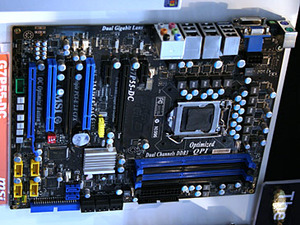
MSI's next generation Core i5/P55 motherboard the G7P55-DC.

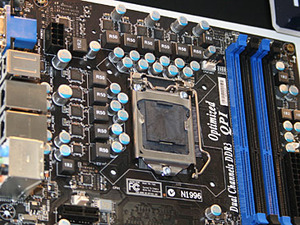
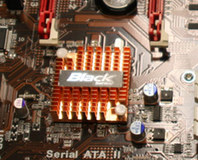
CeBIT 09: Here at CeBIT MSI has Intel’s next generation P55 boards on show, as well as its own G7P55-DC. The first thing to notice is that MSI has upped its DrMOS count from six on Core i7 to ten on Core i5 (although the board actually claims 15 Phase DrMOS in its entirety).

This isn't MSI playing the numbers game either, this is simply because the CPU, GPU, PCI-Express and memory controller needs that much more to power everything. The non-GPU version of the Core i5 fits in the same socket, just with the display outputs disabled, and the extra DrMOS will be excessive for even extreme overclocking.

With four slots of DDR3 for dual channel memory, “optimised” QPI, but a standard rear I/O with VGA and DVI – not two digital outputs – we fear this is a limitation of the CPU-GPU. If so then yet again Intel’s graphics products have fallen behind the competition even months before release.

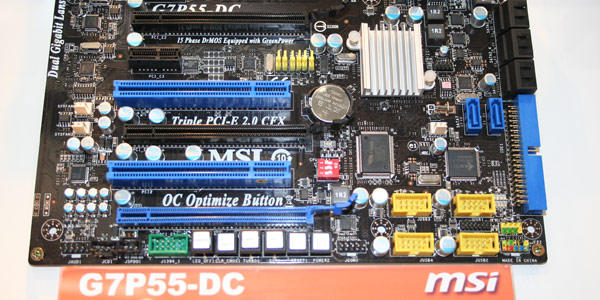
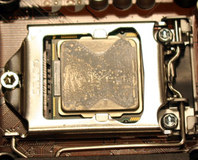
Three PCI-Express 2.0 x16 slots also exist that support both SLI and CrossFire and from the slot colours it appears we might be lucky to get x16/x16 or x16/x8/x8 – this also comes routed from the new Core i5 CPU. In addition there are a few PCI slots and PCI-Express x1 from the lone southbridge – another feature that gives the board far more space to play with for cooling and component placement, as it’s a chip short of a set.

With three “Turbo” buttons intermingled with the typical power, reset and Clear CMOS, this controls MSI’s recent auto overclock (OC optimise) feature that runs an algorithm to automatically overclock the CPU and other features. MSI admits it won’t be as good as a skilled overclocker fine tweaking the values but it’ll get the more inexperienced, or those with limited time, up and running a lot quicker.

Discuss in the forums.

MSI shows off Core i5/P55 motherboard CeBIT 09: MSI shows of Core i5/P55 motherboard MSI shows off Core i5/P55 motherboard CeBIT 09: MSI shows of Core i5/P55 motherboard

MSI shows off Core i5/P55 motherboard CeBIT 09: MSI shows of Core i5/P55 motherboard

23 Comments

Discuss in the forums Reply
GFC 5th March 2009, 11:54 Quote
Want...now..omg..do want now!!!!
V3ctor 5th March 2009, 13:00 Quote
Quote:
Originally Posted by GFC
Want...now..omg..do want now!!!!

I'd rather want a GTS250...
Denis_iii 5th March 2009, 13:34 Quote
looks sweet, interested to see what limitations Corei5/P55 have compared to Corei7/X58
Singularity 5th March 2009, 14:35 Quote
Ok, I'm utterly confused now. I was under the impression that the i5 would use a DMA link and not the QPI?

But, otherwise, a very nice motherboard :)
devdevil85 5th March 2009, 16:19 Quote
Quote:
Originally Posted by Richard Swinburne
Three PCI-Express 2.0 x16 slots also exist that support both SLI and CrossFire and from the slot colours it appears we might be lucky to get x16/x16 or x16/x8/x8
Has any board so far offered x16/x16/x16? I love future proofing. Just so I'm not confused, does Crossfire allow you to use any generation of cards or do you have to use the same generation? I know SLI forces you to use the exact same cards.
TomH 5th March 2009, 16:24 Quote
Is it just me, or has there been a huge lack of information about this? Surely the big 'OMG' should be the GPU on-socket, or have I read this wrong?
Quote:
Originally Posted by devdevil85
Has any board so far offered x16/x16/x16? I love future proofing. Just so I'm not confused, does Crossfire allow you to use any generation of cards or do you have to use the same generation? I know SLI forces you to use the exact same cards.
Not that I'm aware of, but I really don't think you need it with PCI-E 2.0, given that an 8x link carries the same bandwidth as an original PCI-E 16x slot. :)
devdevil85 5th March 2009, 17:57 Quote
Quote:
Originally Posted by TomH
Quote:
Originally Posted by devdevil85
Has any board so far offered x16/x16/x16? I love future proofing. Just so I'm not confused, does Crossfire allow you to use any generation of cards or do you have to use the same generation? I know SLI forces you to use the exact same cards.
Not that I'm aware of, but I really don't think you need it with PCI-E 2.0, given that an 8x link carries the same bandwidth as an original PCI-E 16x slot. :)
But wouldn't you want full PCI-E 2.0 x16 slots, especially if you are only going to be upgrading to better, faster cards in the future that may need that headroom?
pimonserry 5th March 2009, 18:11 Quote
Quote:
Originally Posted by devdevil85
Just so I'm not confused, does Crossfire allow you to use any generation of cards or do you have to use the same generation? I know SLI forces you to use the exact same cards.

http://game.amd.com/us-en/content/images/crossfirex/CF_combo_chart.jpg

You can use certain different types of cards together, but I believe there are limitations (e.g., running a 1GB card with a 512MB card apparently forces both cards to run as 512MB).
devdevil85 5th March 2009, 19:00 Quote
Quote:
Originally Posted by pimonserry
Quote:
Originally Posted by devdevil85
Just so I'm not confused, does Crossfire allow you to use any generation of cards or do you have to use the same generation? I know SLI forces you to use the exact same cards.

http://game.amd.com/us-en/content/images/crossfirex/CF_combo_chart.jpg

You can use certain different types of cards together, but I believe there are limitations (e.g., running a 1GB card with a 512MB card apparently forces both cards to run as 512MB).
Thanks for the chart. I hope current generations can co-exist with future generations. Oh well, that's just wishful thinking I guess and probably not realistic.
TomH 5th March 2009, 22:03 Quote
Quote:
Originally Posted by devdevil85
But wouldn't you want full PCI-E 2.0 x16 slots, especially if you are only going to be upgrading to better, faster cards in the future that may need that headroom?
If you need more than PCI-E 2.0 8x bandwidth from a single slot, before you need to upgrade your motherboard/CPU/memory (negating the others) I'll be extremely surprised. That is 4GBytes per second remember.
ashchap 5th March 2009, 22:21 Quote
Quote:
Originally Posted by TomH
Is it just me, or has there been a huge lack of information about this? Surely the big 'OMG' should be the GPU on-socket, or have I read this wrong?

And the lack of a northbridge is pretty cool too.
HourBeforeDawn 5th March 2009, 23:08 Quote
okay so wait the north bridge is going to be built into the Core I5 CPU? okay can someone throw me some links that talk about this some more? or at least clear up somethings for me lol
TomH 6th March 2009, 01:23 Quote
Quote:
Originally Posted by HourBeforeDawn
okay so wait the north bridge is going to be built into the Core I5 CPU? okay can someone throw me some links that talk about this some more? or at least clear up somethings for me lol
This is what I can't find on the Internet. Almost as-if no-one was meant to know there was a GPU included in the CPU line! I think we should be told... :)
docodine 6th March 2009, 06:44 Quote
Quote:
Originally Posted by devdevil85
Quote:
Originally Posted by TomH
Quote:
Originally Posted by devdevil85
Has any board so far offered x16/x16/x16? I love future proofing. Just so I'm not confused, does Crossfire allow you to use any generation of cards or do you have to use the same generation? I know SLI forces you to use the exact same cards.
Not that I'm aware of, but I really don't think you need it with PCI-E 2.0, given that an 8x link carries the same bandwidth as an original PCI-E 16x slot. :)
But wouldn't you want full PCI-E 2.0 x16 slots, especially if you are only going to be upgrading to better, faster cards in the future that may need that headroom?

Asus P6T6 WS
Cupboard 6th March 2009, 12:08 Quote
Am I right in thinking that the integrated display output won't work with a "normal" i5 processor?
TomH 6th March 2009, 21:43 Quote
Quote:
Originally Posted by Cupboard
Am I right in thinking that the integrated display output won't work with a "normal" i5 processor?
According to TFA, they'll be 'disabled' with a "normal" i5 processor.

I'm still in the dark about all of this, and it's supposedly due to the fact that almost all of the details concerning the chipset are still under NDA. Probably why Rich hasn't said anything else. (Bless.)

Engadget haven't long had a similar Gigabyte P55 board on their front page, too. Of the photos they took, you can zoom in on this one and quite clearly see the PCB marked with 'HDMI' and 'VGA_DVI'. :)

Which is good news. Now I just wanna know what on Earth is going into the sockets. :(
Clay_People 7th March 2009, 17:57 Quote
God damn it! Lol. My friend just to annoy me pointed me to this link cuz I litteral just got an i7 computer for $1,200.00 from dell. Its to be my gaming computer. I wont have it for another 20 days. Now I find there is going to be something better soon. :(
HourBeforeDawn 7th March 2009, 20:11 Quote
Quote:
Originally Posted by Clay_People
God damn it! Lol. My friend just to annoy me pointed me to this link cuz I litteral just got an i7 computer for $1,200.00 from dell. Its to be my gaming computer. I wont have it for another 20 days. Now I find there is going to be something better soon. :(

Wow you bought a gaming system from Dell, I am soo sorry, I hope you feel better soon.
Clay_People 7th March 2009, 21:05 Quote
Quote:
Originally Posted by HourBeforeDawn
Quote:
Originally Posted by Clay_People
God damn it! Lol. My friend just to annoy me pointed me to this link cuz I litteral just got an i7 computer for $1,200.00 from dell. Its to be my gaming computer. I wont have it for another 20 days. Now I find there is going to be something better soon. :(

Wow you bought a gaming system from Dell, I am soo sorry, I hope you feel better soon.

What’s wrong with Dell? The only things I saw I may need to replace down the road would be the PS as its only has 360w. I forgot the name of the Video card but peoples reviews said they could play Crysis at high setting with it. They got about 20-25 fps on high settings in Crysis. But my games aren't even near Crysises level of graphics. Well maybe Fallout 3 and Mass Effect. Also it comes with 6 ram but as you know most places use crappy ram so Ill probity update them too.
Clay_People 7th March 2009, 21:07 Quote
Oh and its DDR3 ram.
HourBeforeDawn 7th March 2009, 21:15 Quote
Quote:
Originally Posted by Clay_People
What’s wrong with Dell? The only things I saw I may need to replace down the road would be the PS as its only has 360w. I forgot the name of the Video card but peoples reviews said they could play Crysis at high setting with it. They got about 20-25 fps on high settings in Crysis. But my games aren't even near Crysises level of graphics. Well maybe Fallout 3 and Mass Effect. Also it comes with 6 ram but as you know most places use crappy ram so Ill probity update them too.

nothing a side from the fact they use sub par components and that their systems are designed to literally die about a week to a month after the warranty ends, and that they are one of the most sued computer builders around and well I could keep going on and on but ehh, personally if your able to return it I would highly recommend it and then read up and build your own system.
Elton 8th March 2009, 15:55 Quote
Dell's lower end stuff is okay, especially if you ever plan to change some stuff out.

Their gaming machines on the other hand are...depressing.
Splynncryth 10th March 2009, 02:16 Quote
Quote:
Originally Posted by Clay_People
God damn it! Lol. My friend just to annoy me pointed me to this link cuz I litteral just got an i7 computer for $1,200.00 from dell. Its to be my gaming computer. I wont have it for another 20 days. Now I find there is going to be something better soon. :(

When x58 came out, Intel said it is on the extreme high end. So I would not expect i5 stuff to be better. I think the pictures of this board back that up in you look at the RAM slots.
Log in

You are not logged in, please login with your forum account below. If you don't already have an account please register to start contributing.


Discuss in the forums

More About...