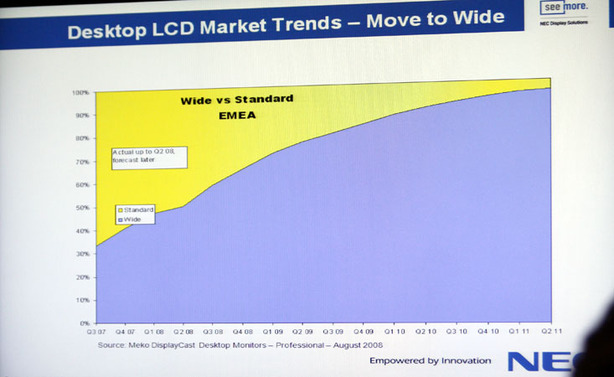
At the current rate of growth, NEC says that it expects more than 90 percent of all desktop LCD displays it ships to be widescreen by the end of 2010.
Birgit Sommerer, European product marketing manager for NEC’s LCD display division, also said that approximately 50 percent of NEC’s display shipments today are already wide-format LCDs.
Despite this industry shift, Sommerer said that NEC still plans to offer solutions for those that require standard 4:3 displays. She didn’t elaborate on what or how many 4:3 displays we can expect to see in NEC’s range in the 2010/2011 timeframe, but I think it’s fair to say that choices will be more limited than they are today – it’s all going to depend on demand.
During a conversation I had with Simon Jackson, vice president of NEC Display Solutions for Northern Europe, I was told that we may get to a point when 4:3 displays are wiped out completely, but he doesn’t see that happening for a long time. Jackson explained that there’s still a significant demand for 4:3 LCDs in a lot of markets and it’s going to take some markets a good few years to even think about switching, if indeed it is the right choice for them.
NEC isn’t the only display manufacturer we’ve spoken to recently that’s making a huge push towards a product range dominated by widescreen displays, as
BenQ unveiled its first 16:9 desktop LCDs just last week.
However, unlike BenQ, NEC doesn’t believe that 16:9 aspect ratio displays will overtake 16:10 and dominate the widescreen LCD market. Instead, the company feels that it’s a matter of using the right tool for the job – in usage models where a 16:10 aspect ratio is desired, it’ll be used. With that in mind, displays will be used when that aspect ratio makes the most sense in the usage scenario.
Therefore, I suspect we’ll be seeing a combination of 16:9 and 16:10 displays from NEC over the next three years or so. For example, 1,920 x 1,080 may be a better resolution for a 22-inch display than 1,680 x 1,050 and it won’t cost the company much more to manufacture and in fact, over time, it could end up being cheaper than the lower-resolution 16:10 panel.
At 24-inches and above though, 1,920 x 1,200 makes the most sense because you’re not losing pixels for general desktop usage (or gaming), and you’re still able to watch video without
overly huge black bars at the top and bottom. There’ll be a 60px black bar at both top and bottom when you’re watching 1080p footage – that’s fine by me, because this downside isn’t going to outweigh the benefits of having those extra pixels for the other uses I have for my PC.
What do you think about widescreen displays becoming more prevalent in the market? And given that, which aspect ratio do you think suits your needs the best? Let us know
in the forums.











Want to comment? Please log in.