Intel's Nehalem processor is shaping up well...
MSI showed us how it is currently testing early versions of Intel’s next generation Nehalem architecture, which is based on the Bloomsfield CPU platform and Tylersberg chipset – the latter will be branded under the X58 nomenclature.
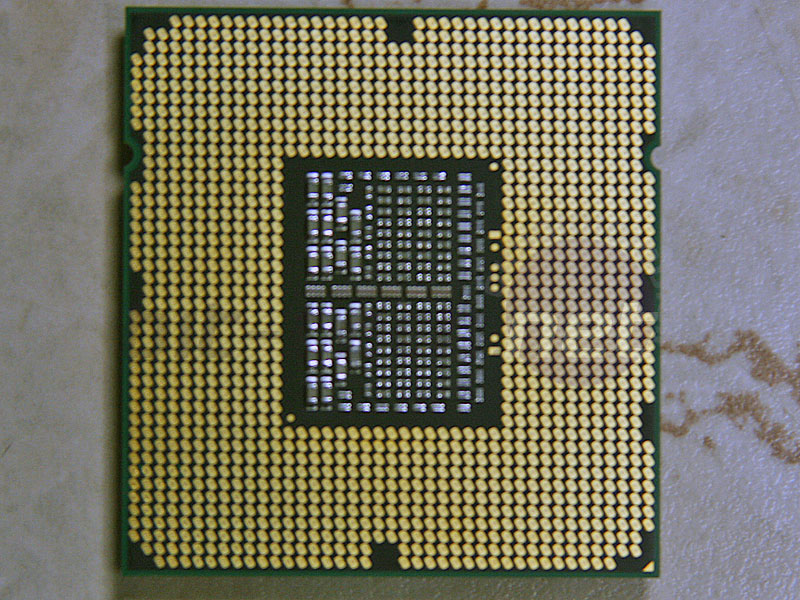
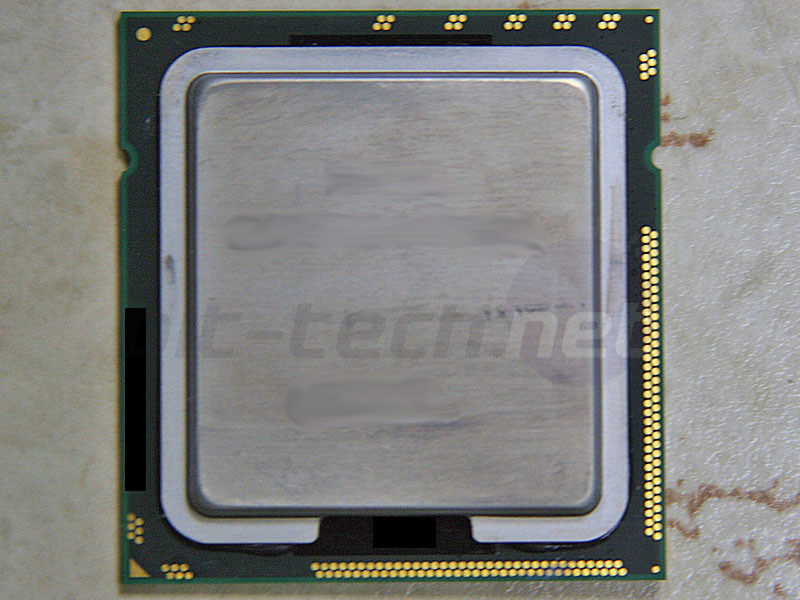
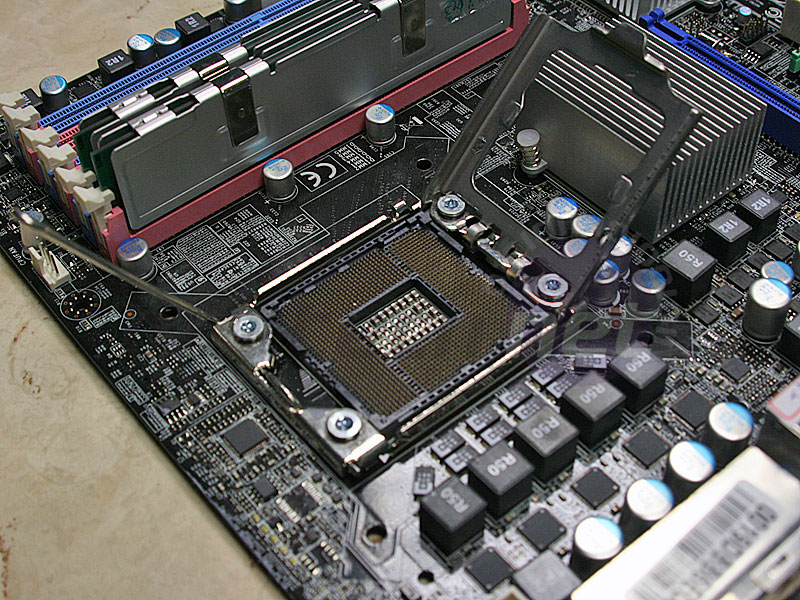
First, the CPU and its new socket: while the roadmaps say the high-end Nehalem to be launched in Q4 will have up to eight cores, the one MSI had in its office was just a quad-core but with eight threads.
The socket is still LGA, but instead of the 775 used on current boards, this one now features 1366 pins and is slightly rectangular – not Pentium Pro rectangular, but simply a stretched out square.
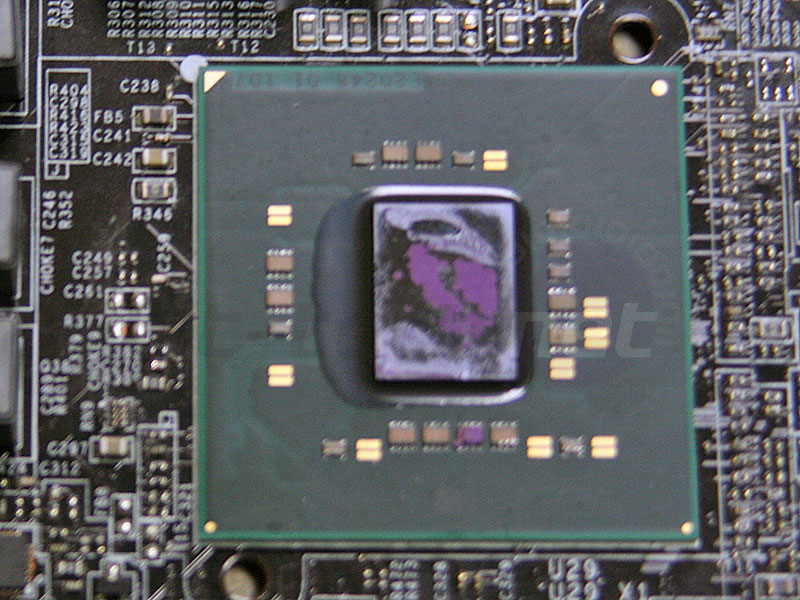
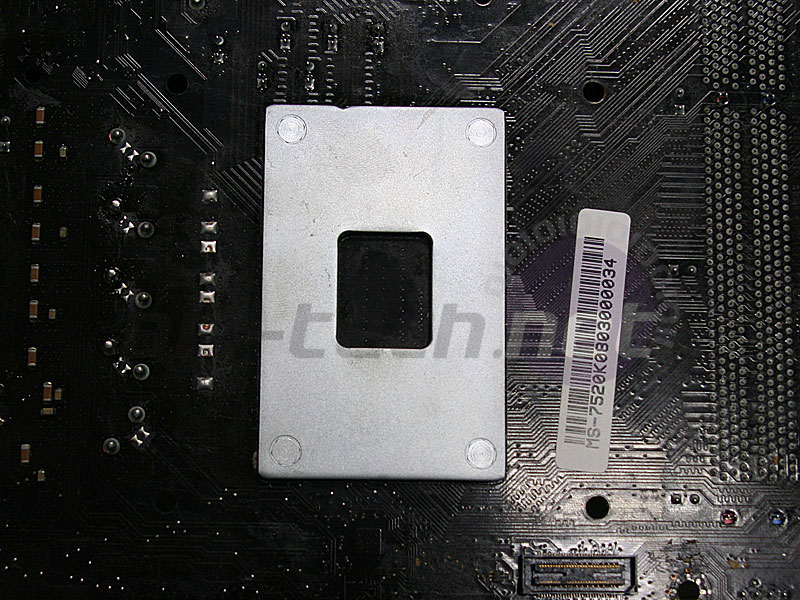
The back of the socket now has a metal backplate to brace itself and I’m afraid you’ll be buying a new heatsink too because the socket fittings have changed since LGA775. In fact, the whole area that needs to be exclusively for “Intel CPU use” is now apparently over twice the volume of that compared to LGA775 giving motherboard manufacturers even less space to shoehorn in additional components.
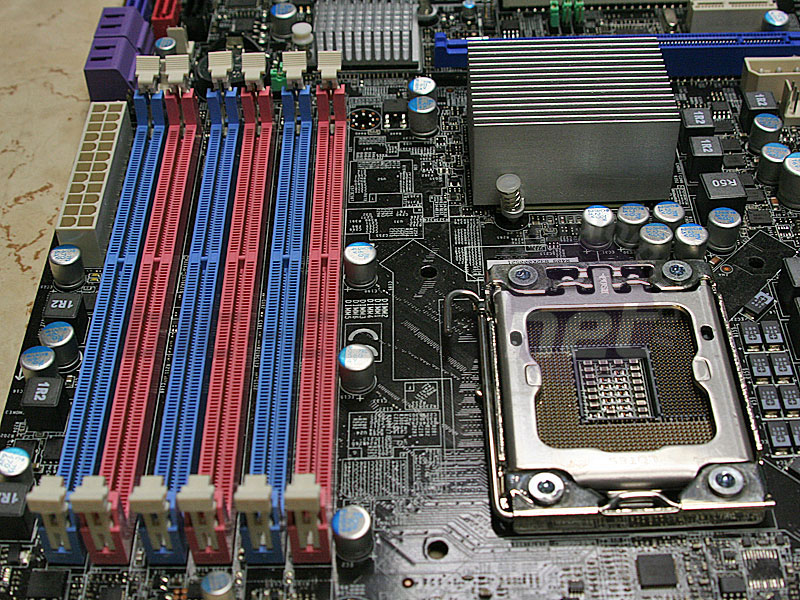
Since the CPU now has the memory controller built in, the memory slots are now that much higher up the board, guaranteeing space above the upper most PCI-Express x16 graphics slot. MSI also includes six memory slots because the CPU has triple channel DDR3, and exclusively DDR3, so you’ll have to buy at least three DIMMs to make the most of the new upper-tier Intel platform.
Tylersberg, or X58 as you will come to know it, actually takes up a very large die-space considering it’s (currently) built on 65nm. MSI told us that it was actually significantly hotter than current chipsets mostly because of the super-fast QPI links from the CPU. It also features 36 lanes of PCI-Express 2.0 so you’ll get a full x16 by x16 and even an x4 thrown in for free – here MSI uses it as part of an extra x16 slot, but now it comes without the downside of disabling other components like current boards have. The south bridge is still ICH10 – so nothing new here.
MSI said it was debating getting rid of the floppy port entirely, and even the PS2 ports, however the company's representatives said they always receive complaints when legacy features are dropped – the most recent was a big backlash over dropping the parallel port in favour of using the space for four USB 2.0 ports?!
While the board isn’t a final product yet – there are still some design changes to be done, it looks like all the usual suspects are being included: JMicron eSATA and IDE, Silicon Image “hardware” SATA RAID, Realtek ALC888 HD audio and RTL8111 Gigabit Ethernet, although MSI does now include eight USB 2.0 ports in the rear I/O.
Give it six more months and you'll be seeing this as a final product in the flesh - we'll be sure to look back and see how it's changed during development. Are you excited by the prospects of Nehalem? Share your thoughts
in the forums.

And what's the deal with the heatsink in a box? Looks kooky, but if it's what to expect.. hmm!
Exciting though :)
It was surprised at the chipset too - but it makes sense given its size (it looked significantly bigger than P45 which is 65nm too) and the tons of super-fast frequency links it has to cope with.
Yea, the big blue block is the reference motherboard manuf. (and case etc) need to adhere to to leave completely free - so capacitors and other components don't get in the way.
It would be a nice stunt to get a hold of one of those and build a pico-ITX system inside of it :D
I dont get it why they dont want to drop the legacy crap though, I mean seriously, you cant even buy devices anymore that use them for several years now (talking consumer market here, servers are a different thing, but they get different mainboards as well so it doesnt matter).
i hope Thermalright's Ultra 120 Extreme is just a bracket away from this new socket.
As for legacy ports, you'll always have some prat that doesn't want to sell his Parallel-based printer. At the end of the day, if it works well, then fair enough. But if it really does work that well then buy a cheap Parallel print server, OR spend a similar amount of money on a PCI/PCI-E Parallel card.
Fortunately (in most cases, though quite the opposite here) it doesn't matter if you're a tiny minority when you're complaining to companies. "Oh noes, angry users!" :(
buy now, wait until the second generations of Nehalem and motherboards come out and some of the issues have been ironed out.
Otherwise you'll end up stuck with another Socket 754 (the first gen of Athlon64's which were pretty soon superseded by 939), and trust me, that's annoying.
Me too. It would be a shame to ditch a perfectly capable HS because Intel changed the mounting holes' distance.
Tim, are you sure the mounting is different? :(
They need a third color of DIMM slot for the third channel... Right now it looks like dual channel with three slots per channel rather than the other way around.
Also, aren't the extra 4x PCIe lanes in the X58 used for the link to the ICH10 SB? Traditionally, the DMI link from NB to SB is 4x PCIe... More info on Nehalem and X58 here... http://www.nehalemnews.com/2008/04/nehalem-faq.html
I think you'll find that's because it is. Except It's not dual channel with three sticks, it's triple channel. It's the performance advantage DDR3 has been needing to ensure uptake, now if only it drops to semi-decent levels. It doesn't need to be awesomely cheap considering the performance advantage triple channel memory would have over dual channel, since enthusiasts would be more than willing to pay a price premium.
Really, 64bit Vista is mature now. Time to let go.
Uumm, yeah, right. Please, could we just don't go there?
I like that idea, I'm tired of legacy taking up space and efficiency, but all they need to do is include a legacy adapter.
Seriously, I don't even have any IDE drives left, haven't used floppy in six years and that was only for my laptop drivers, and while I keep a PS2 keyboard in the closet for emergencies, I haven't had any such emergency in five years. Move on people, I need more Sata ports.
You don't even need to buy that you can just buy a Parrel(DB-25) to USB cable that's what i got at work for all our HP lasterjet printers works a treat, they didn't cost much either we picked up about 40 of them.
Can't wait to see some benchmarks for this, can't wait for it!
thanks, made me recall have then first first giant slot dual fan external cache athlon......times has certainly flown by
And you still have component that needs legacy port like PS2, Parallel Port, and Floppy??
Why not replace them as well?
This was exactly MSI's and my arguments - however they have to listen to all their customers until there becomes a time when it's not economically viable or blindingly obvious that you dont need it anymore.
I would normally agree with those who are calling for the death of floppy drives, indeed, my last two builds are happily floppy free.
BUT...
A friend of mine just wanted me to upgrade his computer with new HDD/DVD-RW etc. and an E4500 in his Asus P5V-VM mobo. Guess what? It needs a BIOS update.
No probs.
Whip out my old USB floppy. Nothing.
Make a CD. Nothing.
Well over an hour of mucking around and troubleshooting, I spend 15 minutes hunting up a floppy drive and cable (which I should have done in the first place).
Install floppy in system, and 3 minutes later I have a newly flashed BIOS and a happy mobo with an E4500 whirring away. 3 minutes!
These things shouldn't be so difficult, but until they are the floppy should stay.
I wonder if it's going to happen something similar on my next system upgrade....
Well, lately ASUS BIOS' have an upgrade utility inside them, with the ability to recognize USB drives. Or you could do it from Windows itself. No need for floppies anymore. :)
System firmware has gotten better all around for modern PC interfaces like USB, but ultimately, what goes onto a mainboard is the choice of the OEM.
You would not believe the sheer amount of stuff companies will still run under DOS, and this is where legacy becomes a huge hassle. DOS is a 16 bit OS based on old PC standards, and expects certain thing.
This little bit of code can be one of the most depressing to come across after hearing "this DOS program hangs the system":
There are utilities that also deal with other old quirks of PC architecture that are no longer necessarily valid.
There are some alternative SIO parts that limit what they have on them, but IIRC, it's usually easier to get a standard desktop chip.
The add in card is a nice idea, and I have seen it done on reference boards, but there is no standard physical interface, and the software needed to set up the chip varies from chip to chip. So the lack of standards make that one tough unless the OEM is willing to do it on their own.
crysis cant/wont even utilise 4 fully, 8 cores is going to be so terribly terribly redundant for desktop use for a good while to come imo
i've not found anything outside of video encoding that will peg my q9450 at 100%
and dvdshrink is now limited by disk i/o rather than cpu
hehe yep, only thing that can stop intel in the desktop market is software not making use of all the fancy new stuff
And about the ports.. they should leave only one PS/2 - for the keyboard, and maybe a floppy. I mean c'mon, parallel port? What the hell for? Even my 1999 black and white (!) laser printer uses USB.
MSI is already doing EFI and I hope they will put EFI on a Nehalem based motherboard as well.
Time to bring the PC up to date once and for all. Just look at the Apple Mac hardware now which is basically a PC with no legacy components.
i strongly advice strictly buy PS2 keyboards.
USB keyboard and mouse will NOT work with system startup shortcuts that you set in the BIOS. a friend of mine wanted to use keyboard shortcuts to start up, but no, the Asus board requires PS2 keyboard to be able to use that feature.
USB isn't amazing, when you get to program with it, you'll find out it's pros and cons. this is why most embedded system programmer still wants legacy RS232 support.
speaking of embedded systems. they have those single PS2 socket to mouse+keyboard PS2 adaptors, why don't manufactures use this? so 1 PS2 will support both keyboard and mouse at the same time, and have the space for 2 USB sockets.
But seriously, PS2 for a mouse has had its day, and for pretty much every other peripheral out there, legacy connection have run thei course.
The only thing I would like to se kept is the PS2 keyboard connection, as was stated by others.
I can even remember the last time I had a PS2 mouse.......
I'm curious as to your experience with USB in embedded systems. My experience is that a solid software stack is needed. But if you are dealing with severely limited firmware storage space and memory, then I can see the appeal of legacy ports.
Did MSI have it running? The photos seem to indicate that they didn't have it running. I was curious as to what they would run for bios, regular or EFI.
Floppy port:
I use a floppy drive once in a while, mainly for running HDD diagnostic tools on bootable floppy disks, but also for BIOS updates. I could probably get around this if needed, as long as the BIOS let you use a standard usb stick for its update. The port also uses a lot of mobo real estate.
PS/2 ports:
I use a PS/2 keyboard from 1989 (IBM Model M), and I see no attraction for moving to USB keyboards - I've still yet to see one made as well as my almost 20 year old IBM. Mice are a different story - they have certainly got better over time, and anything worth using has been for a few years. Solution? use the mouse port space for 2 USB ports, keep the keyboard - I believe ASUS or someone does this already.
Serial/parallel ports:
I use these a LOT, being an electrical engineer who fools about with microcontrollers. The parallel port is very usefull for programming microcontrollers on a budget, and the serial ports I use for talking to said microcontrollers and also to interface IR recievers. USB converters are never as good as a proper port, and simply dont work sometimes in these applications - the move towards killing these off (and the fact I can't get more than one onboard serial) is a big problem for me when choosing a motherboard, and I'll probably end up needing to buy add-on cards in the future and waste precious PCI slots. The headers for these ports are even disappearing from boards which dont have them on the I/O panel - this SUCKS.
If MSI makes it so you can flash over usb, you do not need an internal floppy, just because Asus needs it does not mean MSI does. It is not like you need the MSI board to have a floppy drive to flash the Asus bios...
For memory, I would really like to see how much better TDR is to DDR, or even if is really going to be TDR.
Someone else said that having two colors is confusing and not shows the channels very well. I know some boards have colors for channels and some just have them separated, this board that is shown has the sticks separated and the channels color coded, so red could be the first set is red and you put three dimms in it. And if you want to use the second channel, you put three into blue.
Why do you have to worry about so many legacy devices when almost no one uses them any more. Even my cd drive that I bought recently had a cd as drivers... I thought it odd, but it still worked. I would much rather have a better system than have to worry about my 20 year-old keyboard when I can just go buy an adapter for <$7.
the real thing comes out later and I am expecting it to be a 45, I think that the 65 is just just a test to show what they can do atm.
I just love this post... although I am still with xp atm...
that is the only bad part about new tech is that some times software cannot fully use it. our os's have been years ahead of their time as far as hardware is concerned, but it seems like this time, the next os is going to be late for the hardware upgrade...(I hope!!!)
the only thing I disagree with is the IDE drives, I still have a few that have backups from a while ago. I do like the idea of having more sata drives, but IDE drives are still used a lot today.
i did a small data transferring system from EERPOM to the PC using AVR's. it wasn't so hard with a USB controller, but the USB controller takes a lot of space on my PCB, and doesn't always work. whereas RS232 always works
i seriously don't understand why people so hate legacy stuff, it's not like they will kill you if you keep it.
For me, in my line of work, (EFI engineer) legacy implies DOS support. The problem is that we do a LOT of tricks to make the system work beyond legacy. As a result, we overflow into a lot of other system areas. For example, BIOS was originally limited to the F000 segment because 64K should be enough right? Nope, and some time ago, BIOS was allowed to spill over to E000 too. But this didn't happen before we got the EMM specification.
I've seen behavior where an EMM program will blindly assume that if a certain range of addresses in e000 are uninitialized, then e000 is not in use. But, at least on stuff I've worked on, we lock e000. So the system will crash.
So my major beef with legacy is that it means there is the assumption that everything will work fine with a 15 year old program when in reality, the new stuff and the old stuff are in conflict.