MSI Gaming Laptops with Overclocking

Pressing the Turbo button will make your vision blurry. Either that, or I need glasses.

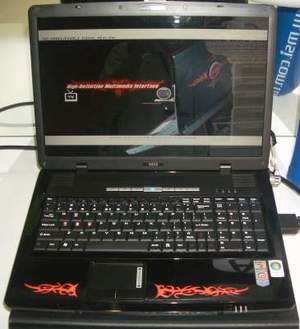
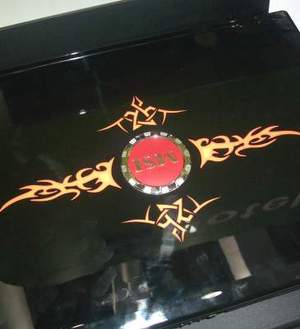
MSI's stand contained some interesting gaming notebooks, featuring not only a funky tribal design and the latest Intel Santa Rosa technology, but also an auto-overclocking button as well.

They will be arriving in both 15.4" and 17" flavours and come with a full keyboard including highlighted WASD keys and a numeric keypad.

The 17" GX710 comes with either an AMD Turion 64 X2 or Intel Core 2 Duo, HDMI, S-Video and VGA output, 4.1 channel surround sound, and an optional embedded TV tuner. Unfortunately it only comes with an ATI Mobility Radeon HD 2600 with 512MB of Hyper Memory, that makes it as good as useless. For the space a 17" notebook gives you, you'd at least expect a full-fat graphics card with its own memory.

The 15.4" AMD version also comes with the same specifications, but in a reduced size chassis. Though with that said, the Intel version is the one to go for.

With PM965/ICH8M and an Nvidia GeForce 8600M GT with 512MB of on-board memory, the GX600 has all the features of the AMD GX610 but also includes eSATA support as well, meaning that this looks to be the far better choice. It also features a turbo button that overclocks the CPU on the fly from 2.0GHz to 2.4GHz by raising the FSB (and subsequently memory speed also) from 200MHz to 240MHz. This function is understandably only available when plugged in, however.

You can expect the same turbo button to arrive on the AMD version in due course, too.

The design might not be to everyone's tastes, and to be honest, I'm not entirely convinced about the cheap looking plastic either. When will companies learn that perhaps gamers want something impressive, not just extremely outspoken? Let us know your thoughts in the forums.

Quote Sparrowhawk 7th June 2007, 16:51
/me blinks
I haven't seen a Turbo button since Socket 7.

Granted, do I have to join Computer-enthusiast's Anonymous before I can own up to still having one or two of those old boxen?
Quote ./^\.Ace./^\. 7th June 2007, 16:59
The turbo button should be named the power drain button :D thats what it's going to do if you'er not pluged into the outlet :D
Quote Drexial 7th June 2007, 17:09
Quote:
Originally Posted by Sparrowhawk
/me blinks
I haven't seen a Turbo button since Socket 7.

Granted, do I have to join Computer-enthusiast's Anonymous before I can own up to still having one or two of those old boxen?


yup thats not something i expected to see again
Quote HugoB 7th June 2007, 17:25
Wow, as you say, the last time I had a turbo button my PC was bigger than I was at the time!! (I was only 8yrs old, and it was 1996...)

I wonder if you get a popup message warnign you not to have it on your lap 'cause it must turn into an oven!!!

Still, a 20% CPU and Memory overclock is not to be sniffed at!
Quote Paradigm Shifter 7th June 2007, 18:36
After the poor build quality of my Acer laptop, I'm wary of anything that is overly and obviously 'plastic'...
Quote FIBRE+ 7th June 2007, 21:30
OMGFUGLY
Quote:
The design might not be to everyone's tastes
Your too polite, I think we can all agree it looks discusting :p

Bring back the turbo button, they were awsome! :D
Quote pendragon 7th June 2007, 21:50
I really like the tribal stuff ;) ..however, a 'gaming laptop' will probably never be something I'd buy. The price of high-end laptops combined with the un-upgradability (is that even a word?) don't make them an attractive purchase for me.
Quote ./^\.Ace./^\. 9th June 2007, 23:31
Would there really be a need for a battery in that laptop :? you know that you would get no battery time if that thing is in turbo so just put another hard drive in its place :|
Quote John - MSI 13th June 2007, 10:06
Nice to hear your comments.... I think in the UK we also agree with a few of them :( We will help feedback these comments to our head office so keep them coming ;)

Just to clear up a few things:
Quote:
Originally Posted by ./^\.Ace./^\.
The turbo button should be named the power drain button :D thats what it's going to do if you'er not pluged into the outlet :D

Lets be honest, a gaming notebook is not designed to be used as an away from power PC, turbo button or no turbo button! In fact I think 99% of dedicated VGA in notebooks will actually drop the clock speeds when no AC is used... hence no power is not an option. The advantage is a laptop you can use anywhere (with battery), and move to your friends / LAN to game (with AC) easily... and for that it should come up trumps
Quote:
Originally Posted by Paradigm Shifter
After the poor build quality of my Acer laptop, I'm wary of anything that is overly and obviously 'plastic'...

Athough the MSI laptops may look like plastic, they are actually Magnesium-Alloy which have the appearance of plastic once coated due to being so light weight, but in actually fact the strength is far superiour to plastic
Quote Bindibadgi 13th June 2007, 10:47
The Turbo button doesn't work when you're not plugged in anyway :)

John, I hope the notebooks we saw were demonstration only because they looked and felt very plastic :/ An Mg-alloy finish would be far far superior!
Log in

You are not logged in, please login with your forum account below. If you don't already have an account please register to start contributing.


Mobile Phones

LG Arena ReviewHTC Magic Review

Compare over 250 mobile phones &
52,000 deals!


Broadband

Mobile Broadband

Compare over 100 broadband & mobile broadband deals online!