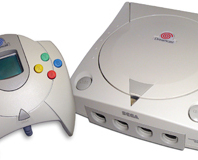
Check out that realistic ghosting effect! (see what we've done there?)
While it’s easy enough to get emulation software for 8-bit computers and consoles, you’re never going to be able to relive the proper experience without a flimsy digital joystick and a CRT TV rather than a flashy LCD monitor. We’re not talking about the decent CRT technology found in last-generation TVs and monitors; we mean the Evil Edna-style box that you might have plugged into the RF socket of an Atari 2600 in 1982. However, researchers at the Georgia Institute of Technology reckon that they’ve managed to successfully emulate the quirks of a dodgy CRT on an LCD, in order to enable an authentic retro gaming experience.
Taking the Atari 2600
Stella emulator as their foundation, team of coders set about recreating the scanline patterns, ghosting effects and colour-bleed that the crustier gamers among us might remember from childhood Breakout sessions. Ian Bogost, who instigated the project,
explains that
“many of today's players may only experience Atari games in emulation. Indeed, many of my students may have little to no memory of CRT televisions at all. Given such factors, it seems even more important to improve the graphical accuracy of tools like Stella.”
Bogost says he gave a Tech Computer Science capstone group the task of modifying Stella to accurately simulate several effects associated with CRTs. These included noise from the RF signal, colour-bleed between scanlines and the edges of sprites, plus afterimage effects. Bogost describes the latter saying that it was the result of the phosphor glow, which he says
“leaves more of an afterimage on the human retina compared to an LCD display. As a result, images might linger after they had moved or changed. Atari programmers took advantage of this feature to "flicker" objects between frames.”
As well as this, Bogost wanted Stella to emulate the “texture” of sprites seen on a CRT TV. He notes that
“the display itself is not constructed out of pixels like a monitor, but out of the phosphorescent glow of an electron beam as it shines through a focusing grate. The result produces slightly separated coloured dots on the screen, which become less visible as the viewer moves away from the set.”
Anyone who regularly watches DVD movies on a CRT TV will know that compressed movies often appear to be much smoother and cleaner than they are on an LCD TV, simply because the CRT’s analogue nature smoothes out edges and hides compression. Similarly, old games will look much smoother on an old CRT TV than they will on a current PC monitor.
Bogost has some screenshots of Enduro, Pac-Man and Yars’ Revenge that demonstrate the CRT emulation in action, which you can see below. According to Bogost, the team is now working with the guys who maintain Stella to patch the CRT emulation changes into the build. Bogost also says that he’s
“hopeful that this software might be extended for use in other emulators for computer systems that used televisions as their primary output.”
Although plenty of other emulators offer primitive CRT TV emulation, this is the first time we’ve seen a concerted effort to really reproduce the quirks of an old CRT TV on a modern computer. Are the effects of a CRT TV needed to fully appreciate retro games, or would you rather have the clean colours and pixels of an LCD? Which other emulators would you like to see using technology such as this? Let us know your thoughts in
the forums.
Via
The Register.
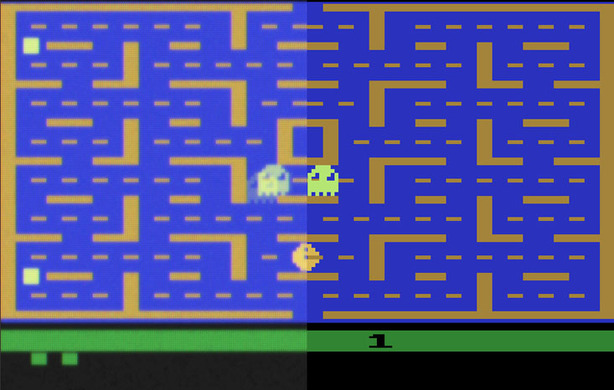
Pac-Man - Note the afterimage effect on the flickering ghosts.
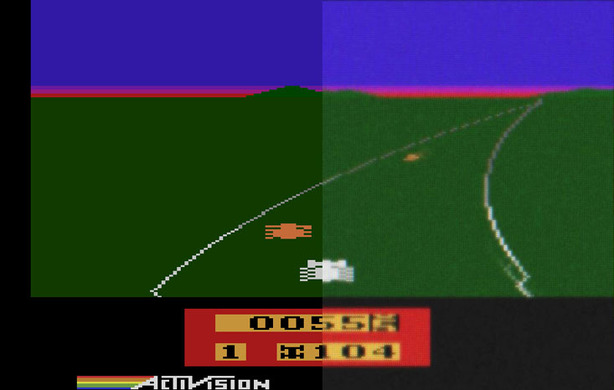
Enduro - Bogost says that the bleeding between the multiple coloured lines in the sunset makes the sky more realistic.
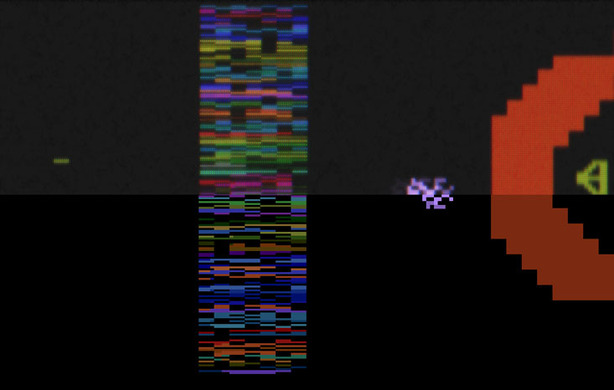
Yars' Revenge - The scanlines give the image a textured feel, rather than simple flat pixels.

True for a monitor it's LCD all the way, as a totally static pixel perfect image is important for things like text, but for TV, never been.
Wish i'd kept my old 19' Mitsubishi Diamond Pro CRT from a few years ago, far better picture all round (blacks that actually look black, colour intensity) than any LCD i've seen.
No bother with running at anything other than the LCD's native resolution either....
And as for stuff like MAME,ZSNES..etc, the old games look far better on a CRT.
In fact the only advantage my LCD has over the CRT is the ability to go into portraight mode for vertical 2d shooters.
I mean let's look at my 17inch and 19inch CRT monitor, both can go 1600x1200 @ 85Hz (no flickering at this level). My monitor cost 400$. You want the same thing in a LCD... well for one it does not exists, you need 2 of them minimum.. one for graphics and the other for movie/gaming. How much they are? Well the first one, 22inch is the closest resolution, is about 1500+$ US, and the second one is about 300$, if you are willing accept several drawbacks. So is for a grand total 1800$.
1800$ JUST to save a little desk space, which is lost because you have 2 monitors, and have the inconvenience of switching every time between 2 monitor, versus a 400$ high-end CRT monitor. To this date I think the LCD technology was a HUGE step back in end result in display. And I am SURE, that if CRT's still widely sold today, they would be thinner, lighter and even better thanks to newer technology, even go at higher Hz.. like 150Hz (when I do that on my CRT (800x600), it feels like looking at a sheet of paper)
P.S.
$1800, really? Where do you live?
why would you do this?
Prices are in Canadian, at the moment of purchase and currently checked.
My CRT was purchased 4-5 years ago, and now starting to show age (it's time has sadly passed form me, and obligated to get an LCD). My CRT was 600$, but price drop when the LCD was coming, and I got it for 400$. It's a NEC.
The LCD I was looking at is the only descent 22inch Samsung screen, meaning no glossy frame, or film and that is height adjustable. It has issues like about all Samsung's, backlit bleeding, 6-bit panel, uneven lit screen and poor color accuracy.
The 1500$ one is an EIZO screen, even backlit, 8-bit panel, proper color accuracy, but because it's not a TN panel, there is even ghosting or reverse gohsting when you move your mouse on the screen, so I don't want to know how it's going to look at when I watch a movie.
And it's not like I am looking at the best.
[rant]
If you can name me a screen 22 or 24inch that has decent level of color accuracy, 8-bit panel, no glossy frame nor glossy screen film, height adjustable, good quality/service, good for games/movies (not the best, just something good that won't show too much from normal distance) and no backlit bleeding... then I am all all ears.
But nooooooo, that doesn't exists, because people (that is what companies says) wants USB ports all around the screen, and 32-displays they can attach to it, and beg for ultra glossy screens made of the cheapest quality that the air itself scratches the plastic.
First make a descent display, THEN you can focus on these things, instead of recycling the same crap display for the last 2-3 years with a new design and added USB port and call it new. >:( Well as long as review sites don't notice and consumers don't as well, then why not, I guess, from a buisness point of view. Even Nvidia is not THAT bad. But I guess it hard things to catch as there are just so many displays out there.
[/rant]
CRT are great don't get me wrong (deep black, no ghosting...) but LCD are so light and convenient
/donecomment
(2) The limitations of TV CRTs (not monitor CRTs in general, since these have advanced greatly) in many cases improved the image of low resolution (around 300 by 200 pixels) images. Try playing a classic game using CGA or MCGA in DOSBox or ScummVM - even with high quality scalers (hq3x) the sharpness provided by current LCDs makes many old games look like a depraved version of Tetris (gratuitous plug: GOG have the 1994 adventure game Beneath a Steel Sky available for free download - you just need to create an account to get it).
(3) Certain games (and computers for that matter) did, as noted in the article, make use of the quirks of TV displays - for example the Apple II made heavy use of quirks in the NTSC standard (discussed here). LCDs don't handle such features so emulation has to address them instead.
I always wondered if LCDs had the sharpness of crts, I have never done a side by side comparison. I was told by a monitor manufacturer that they could not make monitor grade glass in sizes above 21 inches, something about making the entire surface not bend light.
If I could get a 26 inch crt that weighs the same (or even 20% heavier) as my current LCD, I think i would go for it. I do think those days are over though, rip CRTS.
Cool to think that someone went to the effort of replicating the "errors" in the old games. I remember playing Yar's Revenge at my uncles house when i was a Kid. We are talking like 30 years ago, man.
My tastes now are EVE Online and TF2, and hopefully someone will come out with some Falcon 4.0 level complexity flight sims.
Yours in Big Screen Gaming Plasma,
Star¤Dagger
Sharpness of the image of a CRT depends on the quality of the CRT. One reason why CRT failed is because people were going to stores and went "Give me the cheapest computer monitor", so they get a terrible hard to read text screen, at 60Hz, that flickers and cause headache. In was in a time where the average computer users did not understand the concept of "you get what you paid for".
A good CRT will give you a very sharp image, and no flickering or headache.
CRT sizes exists in 32inch and even higher, I think I even saw 42inch CRT screen if I am not mistaken. Back in the old days, people were buying 27inch size screens, and that was considered large. 32inch was getting over the top. Something, thus, that you must remember, is that LCD screens are in widescreen. A 19inch LCD is much smaller in height then my 17inch CRT computer monitor.
CRT TV's and computer monitor are completely different how they work. Computer monitor has 1 pixel (square) which has all the colors. TV are rectangles where it plays with the intensity of each color channel to output a color. CRT TV's even the latest good ones, is no wear a descent computer CRT monitor.
http://3.bp.blogspot.com/_lsW0D5f6cIA/SaTghI5s30I/AAAAAAAAAAk/e7Otip1mvds/s1600-R/you-are-being-monitored.jpg