The vulnerability targeted by the zero-day proof of concept code leaves Windows users open to attack.
A new zero-day attack against Windows, capable of bypassing the User Access Control protections introduced in Windows Vista and designed to prevent malware from gaining administrative access without user authorisation, has been discovered in the wild.
The proof-of-concept implementation of the infection technique, known as Troj/EUDPoC-A, was posted to a Chinese educational forum before being discovered by anti-virus researchers from various security firms.
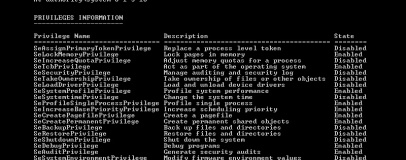
Chester Weisniewski, of anti-virus vendor Sophos, warns that the technique used by the Trojan '
enables an attacker to impersonate the system account, which has nearly unlimited access to all components of the Windows system,' and does so without triggering the User Access Control protections introduced by Microsoft to prevent exactly that occurring.
The flaw targeted by the code is thought to exist in all versions of Windows from Windows XP onwards - including Windows 2008 R2 and fully-patched Windows 7 systems, and thus far no fix for the issue is available from Microsoft.
Marco Giuliani of security firm PrevX warns that the proof of concept code '
could potentially become a nightmare' as ne'er-do-wells rush to take advantage of the flaw before it is patched by Microsoft. '
We expect to see this exploit being actively used by malware very soon,' Giuliani explained, '
it's an opportunity that malware writers surely won't miss.'
The vulnerability is thought to be under active investigation by Microsoft, but so far there has been no word as to an estimated release date for a fix. In the meantime, Sophos has a
workaround for the flaw, but it is unlikely to offer much protection against maliciously modified variants.
Are you disappointed that Microsoft's UAC is proving to be a poor protection, or just anxious for Microsoft to get the flaw fixed as soon as possible? Share your thoughts over in the forums.

45 Comments
Discuss in the forums ReplyIt's quite possibly more annoying than the viruses and adware.
And I am sure Microsoft will patch it soon. People have been using UAC for no reason? Nope, it works, and this is the first one to bypass it in how many years?
Only remedy is to shutdown the PC now and never start it again or unplug Ethernet/wifi until patch is made available now...
All joking aside, this could produce mall-ware that even surpasses the incredibly hard to remove "fake anti virus" mall-ware.
Might be worth checking which AV softwares recognises it and which don't.
I agree though - UAC is annoying as heck and I also turn it straight off once (re)installing Windows.
I'd imagine it'll be fixed by Microsoft fairly quickly, anywhoo.
Same here.
viruses included
a decent firewall that asks your permision to allow programs to accses certain programs and files will definatly block this easily
becaue in order to use this it will have to run and when that happen programs like comodo will be all over it
i pitty any fool who thinks uac and an antivirus is enough (most antivirus programs are signiture bassed so they are useless agasint the worst ones)
Please, infect me with this virus!
Standard practice I think!
It breaks a lot of scripts, or at least makes it impossible to run them without just OKing a huge number of requesters, thus defeating the object of scripting. You can make the argument that "scripts shouldn't need admin rights" but unfortunately back in the real world, outside a computer science exam, the reality is that they often do. UAC in this scenario seems like Windows adopting absolutely the worst characteristics of Linux, which insists on behaving like everyone's desktop computer is a VAX mainframe from the early 80s and is an absolute disaster.
And on Windows you can't even fix it by typing "sudo bash" when you open a new command window.
Is PowerShell affected by that?
Just wondering if this is the one of the method of information gathering used by AV companies; scour forums for hacks and then release statement saying that they've discovered...
I've never used it on Vista or 7, I don't even have an anti virus (although I never recommend to customers running without one.)
I can spot a virus or malware a mile away anyway!
Alex.
No idea, all my stuff is Javascript. Haven't investigated Powershell, on the basis that it appears to be a slightly worse version of just running Javascript under WSH. Windows has had really rather good scripting ever since JScript was introduced; I'm not sure why they felt the need to include another. No, wait, I see exactly why - because of unflattering comparisons with Linux, from Linux users who didn't know about WSH.
So yes, there we have it - there is no reason for Powershell to exist, but it had to, because Linux users didn't know what WSH was. In conclusion: the world is doomed.
I would never disable uac as you just be running xp way of security
I have been seeing user mode fake av soft (thinkpoint) does not seem to use uac, stops programs from opening, could do combofix working on 64bit OS as well
OMFG!
Seriously?
You probably have loads and you don't even know it.
Just because everything appears to be ok it doesn't mean there isn't anything just sitting there undetected, idle or just spreading stuff to other people.
Seriously dude, get some protection, no matter how good you think you are something will always get past.
uac works well if you know how to use the task scheduler to run things at logon.. you'll never see the prompt unless it matters if you set it up right- uac should be all the way up in 7
what's funny by default windows 7 uac is a joke to bypass.. it has safelists like notepad.exe and exploits have already impersonated those files to gain full admin rights.. turn it all the way up or off (dunno why anyone would do this.. but I'm sure they have their reasons)
exploits happen and it's a pretty good exploit.. this is kind of a nightmare for system admins who have to deal with employees opening attachments or running things off usb sticks- hope they get it patched soon
Set objSh = CreateObject("Shell.Application") objSh.ShellExecute "wscript.exe", "c:\Example\example.vbs" , "", "runas", 11,2,3 at end normal,minimize,hidden.. but anyone who writes would know this, that's why it kind of doesn't make sense to say uac is stopping me from writing my scripts
course win 7 has a whitelist by default, but if your running uac with a whitelist you might as well turn it off
After that I never noticed it and it has saved my arse more than once.
Well unless the remastered version of Terminator or Blade Runner comes loaded with a computer created virus from a ulternate future, or some how you can get emailed a virus without an attachment, or eBay, IPlayer, 4OD or Youtube become infected I'm fairly safe!
Ive always said, do dodgey shiz get dodgey shiz on your PChizzle homez.
Al3x.
Its ok, biggest problem on BitTech is the Spammers, and the never ending quest to reach the Relix.
Alex.
Ok so what, a security hole was found, it will be fixed and voila.. now what. UAC is completely safe again. By the time the malware/virus-makers integrate this technique into their attack, which is actually hard and challenging by itself, Microsoft will release a patch. And don't assume that 100% of malware and virus suddenly have the ability to do this. I am sure that less than 1% of malware/viruses will have it.
Beside, we have an A//V to make things even more protected.
UAC should not be disabled. In fact, I think Microsoft should went all in, and apply Linux style. You want admin? get out the terminal (unless you use Ubuntu now they have the dialog box for certain things).
And for those who thing that Windows UAC dialog is stupid as you just click on Continue. Remember that it's like this because you are ADMINISTRATOR. Not the real absolute one, but one. Any other non-Admin users needs to enter the user name and password of an Admin privileged account.
This works because YOU ARE the one running it. Windows blocks this including BAT files from a program to do this. The only possibility is that the program moves your mouse, go inside your folders and double click on the file, all by knowing exactly where each folder and the file is located on your screen, and your window placements (Windows doesn't provide that information), and hopes that you don't move the mouse while it does this. So good luck.
UAC is built-in from the start. It goes all the way down to the core of Windows.
Remember since Vista, nothing is based on NT3. XP was the last OS that was based on NT3, where every version was just newer features and patches done on the NT3 kernel, with minor modification to it.
yeah it elevates a script.. if you ever tried to run a vbs script as admin without the scheduler, you'll see why this works.. most scripts are on a schedule anyhow, so task scheduler is perfect for running scripts you need done at a certain time/login
you'll get the prompt, but that's what uac does.. maybe a way to add run as admin into the context menu for vbs files, but I never tried
Ever since I started running nothing but the Windows Firewall on XP and now Windows 7 I don't think I've had a problem. Frankly, if there is some **** running in the background, I ain't bothered - no-one's swept my bank accounts or impersonated me in an act of terrorism or paedophilia. Yet...
More reasons to be infecting by things UAC pass through attack.
Microsoft Security Essential is what you need. Crazy efficient, doesn't feel it like you have anything running, never bothers you unless for somethings really important (threat), fastest A/V around (also in 64-bit), And beats all free solutions and some paying solutions. It doesn't slow down your computer one bit (and yes it works, check reviews). It scans for malware, spyware and all sorts of viruses from 1 program.
Windows XP you need to unplug yourself from the Internet, and even then. XP protection is like the Berlin wall, with huge holes every 2 meters with the sign "Please enter, you have safe passage here", and you actually do. XP firewall might as well be disabled. Haven't you noticed the times you use a program that access the Internet, and after 2-3 runs, finally Windows firewall ask you to allow it. HELLO! Kinda late! Any program can add itself to white list without you knowing as everything runs as Admin. So abysmal I help no one that has computer problem with XP. And since then, I get peace in mind. Vista/Win7 works and is safe. XP it's problems after problems, infection after another infection. Anyway.
Windows 7 is simple.. if you open something that needs Admin rights that should not, it's most likely a virus or malware. UAC at work. So far nothing can actually penetrate other the discovered method on PAPER. Which is something you should not even worry about, as that is why we have an Anti-Virus, and finally, we have a excellent one.
With XP and older Windows you surf the web you get infected, why?
Some security whole on your web browser or Flash or Java or other plug-in give granted for malware code to be executed and attack your system directly. UAC blacks all that, as no one is admin. Hence why it's important to have it turned on.
Though on W7, you can go the Start > type 'cmd' in search box > and right-click on the search result, to run a cmd prompt with admin rights.
startcmd.vbs
set objShell = CreateObject("WScript.Shell") objShell.Run("cmd") WScript.Sleep 500 objShell.SendKeys "c:\Example\example.vbs" objShell.SendKeys "{Enter}" WScript.Sleep 100 objShell.SendKeys "Exit" objShell.SendKeys "{Enter}"something like this would let him run it all admin if he's running multiple scripts.. or better to just combine the scripts together
call it with something like I posted earlier.. you'll get one prompt
start.vbs
Set objSh = CreateObject("Shell.Application") objSh.ShellExecute "wscript.exe", "c:\Example\startcmd.vbs" , "", "runas", 1or call it from the task scheduler and there's no prompts
http://arstechnica.com/microsoft/news/2010/11/newly-discovered-windows-kernel-flaw-bypasses-uac.ars?utm_source=rss&utm_medium=rss&utm_campaign=rss
So it seams this attack, like the other ones, need to be specifically done on the computer, and cant be done remotely or without the user knowing. So you need to allow the malware real Admin privileges. More reason why to leave UAC on.