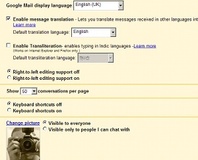
The new "Accounts and Import" tab on Gmail makes it as easy as possible to migrate from an existing webmail account.
It's not just the search engine team who are busy over at Google: the Gmail staffers are putting in the hours to add some snazzy new features as well.
As spotted by
CNet yesterday, Gmail now supports – finally – the ability to easily import message and contacts from your existing webmail service, making it as easy as possible to give Google access to every e-mail you ever send or receive.
Users of the popular free web-based e-mail service may have spotted a change to the Settings function, which has changed the “
Accounts[i]” tab to read “[i]Accounts and Import.” By filling in the relevant details in the new tab, users are able to import both messages and address book entries from a fairly impressive selection of mail providers.
The supported providers
list reads like a roll-call of webmail services including Microsoft's Hotmail, MSN, and Live.com services along with a selection of ISPs including Orange, Freeserve, and Tiscali. If your particular service isn't included, Google will be adding to the list over the coming months as the service rolls out across all Gmail users.
The importation technology – which is powered by TrueSwitch from Esaya – even allows for a soft crossover period, whereby messages sent to the old account for the next thirty days will be automatically forwarded to your Gmail account. Google does mention, however, a 24-48 hour delay both for the initial import and any subsequent messages received – so you may want to ensure that the more important contacts change your e-mail address sooner rather than later.
The new functionality, which Google describes as “
currently available to only a small subset of Gmail users” comes as the company starts to feel the competition from rival webmail services including Microsoft's Hotmail. With other webmail services matching Gmail's impressive storage offering byte-for-byte, it's clear that Google needs to make life as easy as possible if they're going to convince people it's worth making the switch.
Will the new functionality convince you to make the move and join the Gmail masses, or do you think that there's something still missing from Google's offering? Share your thoughts over in
the forums.

GMail has had IMAP support for nearly a year now! Go to Settings -> Pop3 and Forwarding and then near the bottom is the IMAP settings
Just wish Gmail would have a skydrive or live desktop, then I would fully switch from my Hotmail account.
I was going to post exactly the same thing! Durham get IMAP from Monday (about bloody time)
You get access emails using IMAP from Gmails, but Gmail can't access emails via IMAP.
For example: I have my uni email account which I would like Gmail to access the emails from via IMAP. But it can't. I have Thunderbird, which has IMAP support, and this can access emails on my Gmail account.
Does that make sense?
No, I'd like IMAP import, not access.
Edit: oops, cupboard already said that
Currently the work around is having a bit of software on a server that gets the emails from Outlook web access and delivers them to the computing society's web server! when it works, it is fine but it isn't 100% reliable (this morning for example something broke and the cron job emailed me about 50 times) and it has to be run every few minutes so the emails get through quickly.
The only way that would be useful is if you could do it on a computer that is always on. Now if you are a chronic folder, then that is a possibility but mine does get turned off occasionally!
Just got to find something that will let me do that on a server...
Plus, just set up a forward on the server - grab existing messages as above, then all new messages will be forwarded to Gmail automatically.
And that previous post now sounds a lot ruder than I had meant it to be.
Give Google access to my private data? You gotta be kidding.
http://www.google-watch.org/gmail.html
Ali
Google automatically scans e-mails to add context-sensitive advertisements to them. Privacy advocates raised concerns that the plan involved scanning their personal, assumed private, e-mails, and that this was a security problem. Allowing e-mail content to be read, even by a computer, raises the risk that the expectation of privacy in e-mail will be reduced. Furthermore, e-mail that non-subscribers choose to send to Gmail accounts is scanned by Gmail as well, even though those senders never agreed to Gmail's terms of service or privacy policy. Google can change its privacy policy unilaterally and Google is technically able to cross-reference cookies across its information-rich product line to make dossiers on individuals. However, most e-mail systems make use of server-side content scanning in order to check for spam.[40][41]
Privacy-advocates also regard the lack of disclosed data retention and correlation policies as problematic. Google has the ability to combine information contained in a person's e-mails with information about their Internet searches. Google has not confirmed how long such information would be kept and how it could be used. One of the concerns is that it could be of interest to law enforcement agencies. More than 30 privacy and civil liberties organizations have urged Google to suspend Gmail service until these issues are resolved.[42]
Gmail's privacy policy contains the clause: "Residual copies of deleted messages and accounts may take up to 60 days to be deleted from our active servers and may remain in our offline backup systems." Google points out that Gmail adheres to most industry-wide practices. Google has stated that they will "make reasonable efforts to remove deleted information from our systems as quickly as is practical."[43][44]
Google defends its position by citing its use of email-scanning to the users' benefit. Google states that Gmail refrains from displaying ads next to potentially sensitive messages, such as those that mention tragedy, catastrophe, or death. [45]
http://en.wikipedia.org/wiki/Gmail#Privacy