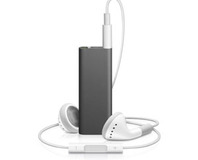
Steve Jobs last night unveiled the winter 2008 range of iPods at the same time as announcing iTunes 8.  The event was rather light on details and substance.

Steve Jobs last night unveiled the winter 2008 range of iPods at the same time as announcing iTunes 8. The event was rather light on details and substance.

Steve Jobs last night uncovered details on Apple's new iPod lineup for this winter, which includes a completely overhauled iPod nano, an updated iPod touch and an adjustment to the iPod classic line.

Jobs also announced iTunes 8, which was actually probably the most exciting thing in the whole keynote... and there's only so much excitement one can generate from a piece of software like iTunes.

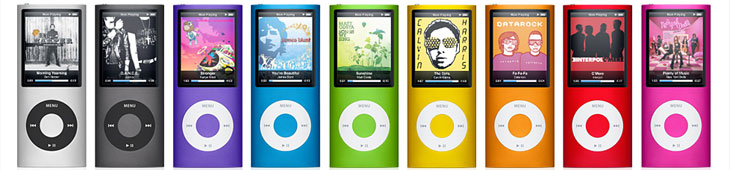
The new nano is thin like the 1G and 2G versions—Jobs claims it's the thinnest iPod ever at 6.2mm—and has a curved aluminium design. It's also lighter than previous generation iPod nanos at just 36 grams and comes with up to 16GB of storage.

The screen is roughly the same size as the 3G nano, but it's been rotated by 90 degrees in order to fit into the nano's form factor. Apple has integrated an accelerometer that enables the device to flip into landscape mode when displaying pictures and video. What's more, Apple has used the accelerometer in another way – shaking the new nano shuffles to the next track. The user interface has changed as well, but it's not an iPhone-esque icon-based interface.

Battery life is projected at 24 hours for music and four hours for video playback after which Jobs pointed out that the iPod nano is the least toxic iPod ever released. It's BFR free, mercury free, PVC free, highly recyclable and also uses arsenic-free glass, said Apple's CEO. He finished with the nano by saying that the 8GB will be priced at $149, while the 16GB will hit $199. In the UK, those prices translate to £109 and £149 respectively.

Apple updates iPod range, releases iTunes 8

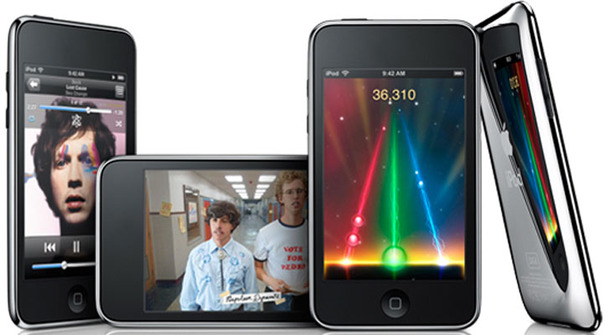
Switching focus to the iPod touch 2G, there's very little to say about the new device – it's merely a gentle refresh. The back has been rounded and there's now a built-in speaker and side volume controls, along with Nike+ iPod software bundled on the touch as well. Storage capacities haven't changed, and battery life is said to be 36 hours for music and six for video playback. In terms of pricing, they'll range from £169 ($229) for the 8GB, to £289 ($399) for the 32GB touch and they're available now.

Both the touch and nano include Apple's new Genius playlist creation feature, which automatically makes playlists from songs in your library that go great together with just one click – this is very similar to what Pandora already does in many ways, as it makes a playlist based on the songs in your preferred genres.

The final update to the iPod line was to the classic – it has been streamlined from 80GB and 160GB models to just a 120GB model in the thinner form factor. And that's it – I think it's safe to say that iPods with mechanical drives will not be here for much longer. Price-wise, the classic retails for £179 in the UK and $249 in North America.

Apple updates iPod range, releases iTunes 8

Genius is also one of the new features in iTunes 8 and in this particular case, it will also suggest new music from the iTunes Store based on what you like listening to. Jobs admitted that library information will be sent to Apple for Genius to work, but it will be anonymous.

There's also HD TV downloads—presumably in 720p—now available in the US; they're a dollar more than the standard definition versions at $2.99. There's no sign of when this will come to the UK though. Additionally, iTunes 8 introduces a new viewing mode called the Visual Browsing Interface – this basically lays out the album and video covers, along with podcasts, apps and audiobooks in tiles.

Jobs briefly talked about iPhone firmware 2.1 as well, but the details were very high level – bug fixes, less dropped calls, better battery life and improved sync times. No specifics were mentioned and there was definitely no talk about all of those features missing from the device. You know, like copy and paste, MMS, video recording and so on. It's available on Friday for iPhone and it's already available now if you've got an iPod touch.

And that was about it – on the whole, it felt like the event was light on substance and a little disappointing in many respects. The new nano looks pretty nice I guess, but I think the shake is a bit of a gimmick personally. The touch has been iPhone 3Gified and the 120GB classic was available in the larger form factor some time ago.

What do you think about Apple's announcements? Discuss in the forums.

Quote koola 10th September 2008, 14:29
This refresh was a refresh imo. The new nanos are great with the silver catching my eye as the most desirable.

Have yet to download iTunes 8, but I heard it's great.
Quote Fod 10th September 2008, 14:32
want yellow nano! want!
also, no 64gb touch? sadFod.

itunes 8 is shiny. there's a new visualiser nobody talked about at launch, but was in the rumours. it's trippin', wack AND outta here.
Quote:
Originally Posted by CardJoe
unveiled the winter 2008 range of iPods
what is this, a fashion show?
oh wait.... yeah.
Quote quack 10th September 2008, 14:57
I love the colour range of the new Nanos. Nice and bright - when you see them lined up like that.
Quote Gunsmith 10th September 2008, 15:43
typical apple. i suppose they'll be a special confrence for them of which thousands of fools will flock.
Quote samkiller42 10th September 2008, 15:47
I suppose, itunes 8 is a nice large 80mb file to download. Apple, please release nice small patches, please.

Sam
Quote liratheal 10th September 2008, 15:49
So far, iTunes 8 has been a massive waste of time for me. That stupid album art sorting method is about as usful as, to quote Dodgeball, a 'cock flavoured lollypop'.

Also, there is still no iPod that shoots bees. I'm not interested in a new iPod until it shoots bees, they seem to do everything else.
Quote quack 10th September 2008, 16:00
I'd rather it shot shurikens and lightning myself. ;)
Quote liratheal 10th September 2008, 16:14
Quote:
Originally Posted by quack
I'd rather it shot shurikens and lightning myself. ;)

Hahahaha

Touché, good sir, touché.
Quote BigD79 10th September 2008, 16:19
i read on engadget that it's not working with AirTunes and that connecting the iPod Touch will give you the BSOD.
Guess a patch or two will appear shortly.
Quote Bauul 10th September 2008, 16:21
Have people been watching too much ZP?
Quote liratheal 10th September 2008, 16:24
Quote:
Originally Posted by Bauul
Have people been watching too much ZP?

Does watching the new ones count as too much? :B

Does he reference shooting bees in one or something?

If so, I need a new feature request.
Quote wuyanxu 10th September 2008, 16:40
i've read reports of BSOD-ing the Vista computers when iTunes 8 and iPhone/Touch is plugged in. anyone else experienced this?

iTunes 8 wasn't anything special. iPod Touch is even less of a refresh than iPhone 3G to iPhone. iPod Nano looks fantastic, would buy that if i haven't already have a iPhone.
Quote itazura 10th September 2008, 16:45
i actually quite like that version of the nano. especially with all those colours! :D the last one was terrible imo.

tempting to pick one up, i must admit. i was looking at getting a cheap 8gb sony to replace my broken ipod, but i might just wait until the new nano's come out and get one of those instead.
Quote atanum141 10th September 2008, 16:58
Looks like im the only one interested in the new 120G Classic, which i shall be purchasing.
Quote -EVRE- 10th September 2008, 17:19
OOOOOhhh Nano in perdy colors!

*Oh snap!*
Its an Ip-od... a very closed, over priced device.. just like the Zune!

if you want an mp3/video device I have found much more pleasure in ownership having a sony video walkman, and there are many other fine choices out there that allow you to easily place, remove or pull music and video from without any special software... as long as your running xp or later.

In my opinion, someone who buys an Ipod doesn't have a clue, or an appreciation of the open alternatives out there.
Quote M_D_K 10th September 2008, 17:41
Quote:
Originally Posted by -EVRE-

In my opinion, someone who buys an Ipod doesn't have a clue, or an appreciation of the open alternatives out there.

God forbid that they just want the ipod because it looks good or that its their choice, there are always more options out there but its upto the end user to decide if they are better or worse or if it'll meet their needs.


Im very tempted by the new Nano looks slinky :)
Quote Cupboard 10th September 2008, 17:47
aww they are making my Zune look even fatter and uglier than it already does :(
Still, it works. And I must be one of really not very many people in the UK to have one :)
Quote Nexxo 10th September 2008, 17:58
Quote:
Originally Posted by Fod
itunes 8 is shiny. there's a new visualiser nobody talked about at launch, but was in the rumours. it's trippin', wack AND outta here.
It's Magnetoshpere which started life as an independent free add-on. Looks like Apple has adopted it.
Quote p3n 10th September 2008, 19:18
Sake no MBP refresh till the back to school is over then :(
Quote kempez 10th September 2008, 19:23
New iTunes = good :)

Genius?? Bad?
Quote:
Originally Posted by Apple
Sending Information About Your iTunes Library to Apple
Genius is able to make playlists and give you great recommendations by periodically sending information about your iTunes library to Apple. This information will only be sent to Apple if you choose to turn on Genius.

The information sent to Apple includes details about the media in your iTunes library such as track names, play counts, and ratings. This information will be stored with an anonymous Genius ID and not linked to your iTunes Account. When using the iTunes Store or Genius sidebar, Apple will also use your purchase history to give you better recommendations.

The information about your library will be anonymously combined with information provided by other Genius users. Apple will use this combined knowledge to improve Genius playlists and recommendations for everyone.

I want to turn it on to look, but don't want to send stupid details to Apple. Gah
Quote BioSniper 10th September 2008, 19:41
Quote:
Originally Posted by M_D_K
Quote:
Originally Posted by -EVRE-

In my opinion, someone who buys an Ipod doesn't have a clue, or an appreciation of the open alternatives out there.

God forbid that they just want the ipod because it looks good or that its their choice, there are always more options out there but its upto the end user to decide if they are better or worse or if it'll meet their needs.


Im very tempted by the new Nano looks slinky :)

I'm going to agree with M_D_K here.
I've had several different players, Creative, Samsung, Sony, Rio and not one of them was a nice for me as the iPod in terms of usability.
iTunes works for me with little effort and the hardware also looks pretty nice which is a bonus.

Sure some people buy them without knowing the alternatives but loads of us also buy them through choice.

M_D_K: I am also seriously tempted by a Nano, don't really need it but its within impulse buy range :P
Quote specofdust 10th September 2008, 19:47
Downgrading the classic to 120GB? God damnit that's Apple doing their best to destroy the one thing they had going for them, a relatively cheap very high capacity mp3 player. I've got an 80GB classic (birthday present, woo yeah!) and it's great. I'd happily buy something which is exactly the same in a few years time but that had an even larger drive capacity (say, 300GB, or even just 250GB). That Apple seem to think people are running out of stuff to stick on their Ipods is stupid and it blows.
Quote BioSniper 10th September 2008, 20:07
The problem is (if you actually take some time to watch the key note) is that they want to use single platter drives only to keep the profile down. As soon as you go for larger sizes you get thicker units and it doesn't make enough sales to make financial sense to keep running a barely purchased SKU.
Quote Firehed 10th September 2008, 20:33
Quote:
Originally Posted by Fod
want yellow nano! want!
also, no 64gb touch? sadFod.

itunes 8 is shiny. there's a new visualiser nobody talked about at launch, but was in the rumours. it's trippin', wack AND outta here.

what is this, a fashion show?
oh wait.... yeah.
Same, I'm definitely picking up one of the yellow nanos soon enough.

I for the most part quite like iTunes 8, but the new grid view totally breaks playlists I suppose it'll get addressed in 8.0.1. Genius is OK, and it sounds like it should get better over time as its database grows. No opinion on the visualizer really, as I only have iTunes as my front app if I'm watching video in it.

edit - spec, you should really look into playlists sometime :)
Quote hacker 8991 10th September 2008, 20:54
Not much mention of iTunes 8 in this, eh? I'm liking it so far. The Genius playlists are like Pandora but with your music.

If you're interested, I wrote a little review of iTunes 8. Thankfully somebody else discovered how to turn off genre when browsing!
Quote Bluephoenix 10th September 2008, 21:05
Quote:
Originally Posted by -EVRE-
OOOOOhhh Nano in perdy colors!

*Oh snap!*
Its an Ip-od... a very closed, over priced device.. just like the Zune!

if you want an mp3/video device I have found much more pleasure in ownership having a sony video walkman, and there are many other fine choices out there that allow you to easily place, remove or pull music and video from without any special software... as long as your running xp or later.

In my opinion, someone who buys an Ipod doesn't have a clue, or an appreciation of the open alternatives out there.

I think the iPod line is the one thing apple got right

It can be used as an external disc, it works usually without hassle, there are plenty of media center alternatives that support it (Jriver, amarok, etc), and it is well supported in peripherals and by the company that designed it.

true, it doesn't do a hundred snazzy different things, but it does what it was designed to do, and does it well, for a decent price (if its a classic, the touch and nano are still overpriced IMHO)
Quote spectre456 10th September 2008, 22:55
i don't if it's just me but didn't bit-tech post a news article a while back about leaked ipod nano pics? (maybe it was a different site but i can't remember very clearly). anyways i remember all of the initial reactions being rather negative. how ugly it looked but now everyone loves the look ?

on another note, i'm definitely not going to be buying any ipod for a long long time. not 'till a proper addition such as bluetooth, for example, instead of trivial crap like an accelerometer (i sense they added it mainly for games).
also, someone needs to slap apple for making customers pay for friggin' software updates which is complete toss.:(
Quote docodine 11th September 2008, 05:12
I think all the Nanos have been ugly since the 2nd gen. This one looks like a Pop-Tart.

Does anyone know of a music player based around a 2.5" hard drive? Preferably user-upgradable.
Quote Blademrk 11th September 2008, 08:36
I think I prefered the look of the shorter nano.

The battery died on my 80gb classic last week, so looks like I'll either have to try and get the battery changed out or replace it.
Although I said I would never get one (this was given to me as a present), I did find the ipod handy because I had an alpine car radio with an ipod adapter which let me use the ipod as a very small disc changer.
Quote -EVRE- 11th September 2008, 10:29
*An Ipod from my point of view to clarify

My desktop is my main music holding machine.. I tunes inconveniently doesn't include a very easy way to sync your purchases made on multiple computers, say my desktop and laptop. Well, one day I had a very bad thing happen to a striped raid.

No worries I thought, my nano has the music from both my laptop and desktop, I'll just restore my desktop from the Nano. *That seemed like a reasonable assumption at the time, I paid for the music, it includes my key from my account*

WRONG! Turns out a patch/update in Itunes made that impossible... so having exhausted any legal way to recover the music I paid for.. it was time to google.. I thought I found a nifty little program that would pull my music from the nano and restore it to my HDD.. nope... use of that software borked the nano and forced a factory reset, afterwords... no music left on the Nano.. $40+ worth of songs.. gone. (imagine a larger library.. maybe hundreds of $$$)

THE REASONS why my music I paid for was gone?
1. Have to burn a CD with Itunes to back up, cant just use a flash drive.. what a pain in the ass. So far the only way I know how to copy from one computer to another my library is to Zip it, then unzip it on desired computer. A ^$^#&*# pointless workaround.
2. Cant pull music placed on Ipod back to PC
3.Itunes / Ipod are a closed system!

So.. in ending to put out those flames..

I'm not saying the ipod is a device that doesn't PLAY music and videos very well, but that's its got a death grip on your files and wont let go because Apple said so.

should you have the need or desire to copy your Ipod's music library to another of your computers.. no can do.. something the open competition has been doing for years. It boggles me that Apple is creating a device that is limited in this way.. After all.. the music still has its DRM, only computers authorized can play them anyway..

So.. get a clue.. and some appreciation for the competition.

I certainly have!
Quote Notional 11th September 2008, 13:18
-EVRE-: Welcome to DRM hell! DRM is all about punishing the buying costumer, because pirates aren't bothered by these problems. It's a real shame, since it's destroying the online market. I wouldn't blame Apple for that, but the music industry. These problems excists on oner platforms as well.

I have the 2nd gen Nano, but the "next" button is starting to tirre out. The new Nano looks pretty cool though. Ooh shiny... colours...
Quote liratheal 11th September 2008, 13:24
Quote:
Originally Posted by -EVRE-
*An Ipod from my point of view to clarify

My desktop is my main music holding machine.. I tunes inconveniently doesn't include a very easy way to sync your purchases made on multiple computers, say my desktop and laptop. Well, one day I had a very bad thing happen to a striped raid.

No worries I thought, my nano has the music from both my laptop and desktop, I'll just restore my desktop from the Nano. *That seemed like a reasonable assumption at the time, I paid for the music, it includes my key from my account*

WRONG! Turns out a patch/update in Itunes made that impossible... so having exhausted any legal way to recover the music I paid for.. it was time to google.. I thought I found a nifty little program that would pull my music from the nano and restore it to my HDD.. nope... use of that software borked the nano and forced a factory reset, afterwords... no music left on the Nano.. $40+ worth of songs.. gone. (imagine a larger library.. maybe hundreds of $$$)

THE REASONS why my music I paid for was gone?
1. Have to burn a CD with Itunes to back up, cant just use a flash drive.. what a pain in the ass. So far the only way I know how to copy from one computer to another my library is to Zip it, then unzip it on desired computer. A ^$^#&*# pointless workaround.
2. Cant pull music placed on Ipod back to PC
3.Itunes / Ipod are a closed system!

So.. in ending to put out those flames..

I'm not saying the ipod is a device that doesn't PLAY music and videos very well, but that's its got a death grip on your files and wont let go because Apple said so.

should you have the need or desire to copy your Ipod's music library to another of your computers.. no can do.. something the open competition has been doing for years. It boggles me that Apple is creating a device that is limited in this way.. After all.. the music still has its DRM, only computers authorized can play them anyway..

So.. get a clue.. and some appreciation for the competition.

I certainly have!

As far as I was aware, when you buy music on iTunes it's only a case of whacking in your apple ID and checking for purchases on iTunes? It's all I had to do when I lost my PC based iTunes (I buy most of my music on the Mac, since the iPod syncs to it).
Quote wuyanxu 11th September 2008, 14:08
Quote:
Originally Posted by -EVRE-

THE REASONS why my music I paid for was gone?
1. Have to burn a CD with Itunes to back up, cant just use a flash drive.. what a pain in the ass. So far the only way I know how to copy from one computer to another my library is to Zip it, then unzip it on desired computer. A ^$^#&*# pointless workaround.
2. Cant pull music placed on Ipod back to PC
3.Itunes / Ipod are a closed system!

1. yeah, that's silly. but surely you are able to re-download the music off iTunes once you enter your account details. i always do that with AppStore apps.
2. actually you can. on PC, there's iPod player, used to put on my ipod shuffle's memory stick section. i can plug it in, run it and play (or copy if you want) all music on my shuffle through PC.
3. it's closed system because of DRM. if you don't want DRM, im sorry, only way is to pirate the music. (shame really, just like the DRMs on PC games destroying the platform)

the reason people buy iPods is because of the ease of use. no matter what little-known music onto it, it always gets the tags correct. i have a few very little known soft tunes for listening during study/office, and it gets all correct. i have used a few other cheap MP3 players that's like a memory stick, drag-drop and play. but it almost always never gets the tags correct, just displays filename. and its very hard to use.
Quote Bluephoenix 11th September 2008, 14:30
I never said anything about the iTunes store, I hate the thing

my argument is that the Hardware works well, not the purchasing and key management system (thus why I listed alternative players)

in EVREs case, since it IS a striped raid, it would have been an excellent idea to simply copy the itunes music folder and library file to an external HDD, and use that to restore in the event of failure (not just for itunes, backups are simply good computer management)[I have done this myself after a failure last month, no issues]

also if you don't buy from the itunes store, but from somewhere like, say, amazon; the files come as raw .mp3 anyway, no ugly DRM.
Quote -EVRE- 11th September 2008, 17:55
Quote:
Originally Posted by wuyanxu
1. yeah, that's silly. but surely you are able to re-download the music off iTunes once you enter your account details. i always do that with AppStore apps.
2. actually you can. on PC, there's iPod player, used to put on my ipod shuffle's memory stick section. i can plug it in, run it and play (or copy if you want) all music on my shuffle through PC.
3. it's closed system because of DRM. if you don't want DRM, im sorry, only way is to pirate the music. (shame really, just like the DRMs on PC games destroying the platform)

the reason people buy iPods is because of the ease of use. no matter what little-known music onto it, it always gets the tags correct. i have a few very little known soft tunes for listening during study/office, and it gets all correct. i have used a few other cheap MP3 players that's like a memory stick, drag-drop and play. but it almost always never gets the tags correct, just displays filename. and its very hard to use.

1. I have tried that in the past, and all Itunes has done is say "All purchases have been downloaded for this account"
"Purchases can only be downloaded once. You can burn a CD, DVD, use shared folders on your local network to transfer them to another computer."

so.. if you bought say, 20 songs from 5 different artists of music you already have music from, imagine how fun its going to be trying to remember and figure out what directories to copy over flash drive or network. Like I said earlier, I zip the entire music directory (thats no small feat, takes my computer quite a while to compile all those gb...) on the other computer I decompress the files back, and any new files get placed automatically into the correct directories. My way of doing it saves me from having a TON of coaster DVD's every time a made a few purchases from Itunes.

2. That means taking my 4g ipod with 3.7g of music... =/ the math says I cant put much in it as a drive to copy the music. Unless it can read a figure out that garble of directories and cryptic names Itunes gives the music you put on it.

I really didnt care about Itunes DRM system until I found its stupid limitations, there should be no reason to garble the file names to make it impossible to copy from Ipod to desktop if the DRM data with my account name and password are still intact.. after all that should mean that only I can play the music, where ever it is stored.

Since I have been buying from pawn shops and Ebay the original disks, I have found alot of new music I like, all the tags are correct because they are all looked up on the online DB, any music I have from other sources, I have had VERY few not have correct tags read by my sony walkman.

soo.. I hope I'm educating a few of you people still buying from Itunes and thinking about a shiny new Ipod what the disadvantages are, and how crappy the system can be if you have more than one computer or have a data loss how frustrating the Apple system can be..
Quote kempez 11th September 2008, 18:02
In fairness you could have simply copied the music on the Nano (using at as a USB drive), onto your PC and imported it into iTunes
Quote dragon2309 11th September 2008, 18:05
gotta get me one of those new touches... runs to For Sale section to sell current 8Gb ipod touch
Quote -EVRE- 11th September 2008, 18:32
Quote:
Originally Posted by kempez
In fairness you could have simply copied the music on the Nano (using at as a USB drive), onto your PC and imported it into iTunes


have you seen how the files are arranged and named on an Ipod? I have read the files in the ipod by browsing to them, even played them, but when a file is named WH34.m4p or whatever when its Maroon5 Wake up call, what good is that going to do me for hundreds of songs? have me rename and place in organize in proper directories them all?

your saying I tunes will import and make sense of a garbled mess it puts on the ipod if you tell it to import from the Ipod as a drive *F:\ or something?* and not inside the Itunes program?

Every time I have tried to copy music from Ipod to PC from inside Itunes I get the little circle cross telling me NO!!!

and as far as I'm aware, the Ipod will not play music inside the designated drive section, so why put the music there if the Ipod cant play it? its the same as putting it on my flash drive.
Quote Bluephoenix 11th September 2008, 19:12
of course itunes won't let you copy inside the application itself, no media center I've used ever allows that.

what you need to do is "enable disk use" on the ipod (prior to the failure!!!), copy that music folder to the desktop, and then have itunes import the lot and organize it, then delete the copied folder and you should be fine.

as of now there is no way to recover playlist info, but gracenote CDDB and the tags should be able to help you get that back together.
Quote kempez 11th September 2008, 19:36
Quote:
Originally Posted by Bluephoenix
of course itunes won't let you copy inside the application itself, no media center I've used ever allows that.

what you need to do is "enable disk use" on the ipod (prior to the failure!!!), copy that music folder to the desktop, and then have itunes import the lot and organize it, then delete the copied folder and you should be fine.

as of now there is no way to recover playlist info, but gracenote CDDB and the tags should be able to help you get that back together.

Yep that's what I meant, works well. I've done it on several PC's and on several Apple devices, all you need is the Apple ID you bought the music with
Quote -EVRE- 11th September 2008, 19:51
Quote:
Originally Posted by Bluephoenix
of course itunes won't let you copy inside the application itself, no media center I've used ever allows that.

what you need to do is "enable disk use" on the ipod (prior to the failure!!!), copy that music folder to the desktop, and then have itunes import the lot and organize it, then delete the copied folder and you should be fine.

as of now there is no way to recover playlist info, but gracenote CDDB and the tags should be able to help you get that back together.

OK. there is a convoluted way to get music back in some form..

But lets also keep in mind the person who's not computer smart and doesn't have geeky friends

This person goes to their Best Buy, gets a nice laptop and a shiny new Ipod. A few months goes by, this person buys a few albums from Itunes. This person also doesnt know about the whole backup system in case disaster strikes, some how that laptop's hdd is ruined. Now what?

*Really, how many people actually backup their collection on a regular basis, chances are even if you do, you dont do it for every purchase so there is still a high chance you will loose some new music if you have a failure*
*I am aware Itunes allows a redownload of music ONCE but the download was incomplete when I did it, not all the music was there, and I was warned it could happen. That was my first experience with a loss with Itunes. It happened because I forgot my windows based folders when I did a reformat, now I make a special directory for Itunes to place its music files in thats not in the my documents folder. **Vista wont let you in there if you try to access from a different computer with that HDD, thats the main reason for me doing it now** I don't do a backup I just copy the music to multiple computers*

Back to our poor soul..

So what now? As long as they have that ipod they can keep playing their music?

Lets rewind a little, instead of an Ipod purchase this person gets an open style product and uses either CD's or a service that has DRM free .mp3's

laptop fails, no problem, once its up and running again, just hook up the mp3 player and copy the music back to the laptop's hdd and enjoy.

Most players, like my walkman sync right up with WMP, altho that is defintly not my first choice for managing my music.. But for the not so savy it will get the job done, and in some ways superior to Itunes.

I think my point is fairly clear, Itunes/Ipod can.... will cause grief for its customers should something happen.
Quote kempez 11th September 2008, 19:55
But that's all you need to do, copy the iPod's files onto the 'laptop' (to use your example) and import them into iTunes. Not very hard??
Quote wuyanxu 11th September 2008, 20:27
let me get this straight: you hate iPod because iTune doesn't allow you to copy music out of the device??

by your logic of ownership, you must also hate online activation put on games and the problem of not able to legally rip DVD's.

there's also this problem of items, if you've bought an item such as a great foreign medicine, you must be able to take it anywhere around the world because you own it. even though the law of some country say that specific medicine is banned. because you own the item, and the law (aka. digital right) doesn't apply to you?

we all hate DRM, but you just got to live with it.
Quote -EVRE- 11th September 2008, 21:51
Ok, I'm going to try it when my sister gets home, see how well this works..
Log in

You are not logged in, please login with your forum account below. If you don't already have an account please register to start contributing.


Stats: 0.076 seconds