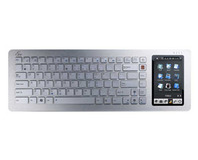
If you're salivating over the soon-to-be-released low-cost desktop Eee from Asus, then you'll want to check out the pictures that
AnandTech has put up.
The unit, which has been rumoured for quite some time, is designed to do for the desktop market place what the Eee PC has done for the notebook market: demonstrate to people that for the vast majority of their needs, a low-cost and low-power machine is more than capable of keeping up. As an example, I'm writing this article in OpenOffice.org and using The Gimp to edit the image on the right – both of which work absolutely fine on my Eee PC 701 at a fraction of the energy consumption of this creaky old desktop.
The specs of the engineering sample received by AnandTech are pretty impressive compared to the current Eee PC notebooks: build around a 1.6GHz Intel Atom CPU running on an Intel 945G chipset, 1GB of DDR2 memory, and a 160GB Seagate 2.5” SATA drive for storage. Interestingly, Asus has opted not to put an optical drive in the unit – although I can't imagine a slim drive would have added
that much to the price or size. Connectivity is covered with built-in gigabit Ethernet and 802.11n WiFi – backwards compatible to 802.11g and 802.11b. You also get a DVI connection to hook it up to your TFT screen for maximum quality.
Perhaps most interestingly of all is that the device, although shipping with Windows XP in this particular incarnation, includes Asus's
SplashTop, a technology which embeds a simple Linux distribution onto the motherboard and allows instant-on access to media playback, web browsing, and instant messaging without the need to wait for the main operating system to load.
If you were hoping that the unit would make an ideal living room PC, there's something to be aware of: noise. According to the AnandTech article, the system features a fan to cool the Atom CPU down which is surprisingly noisy for such a small box. Whether this is something that will be addressed in the final revisions before commercial launch we'll just have to wait and see.
Pricing and availability is still not available, but with such a polished product already available to select reviewers it's clear that Asus can't be far away from launch.
If you want to see more images of the bits that make up Asus's latest, check out the
AnandTech gallery.
Anyone here fancy cutting their electricity bills by switching to a desktop Eee for their everyday computing and keeping a ninja rig just for gaming, or is Asus's latest just a solution looking for a problem? Share your thoughts over in
the forums.











Want to comment? Please log in.