Testing Time
We followed our standard case testing methodology, as detailed in our
previous heatsink and case testing article, and fitted the usual set of hardware into the Dragon CH-07, doing our best to hide and tidy cables to ensure as few airflow restrictions as possible. Here's a reminder of the hardware we use.
CPU: Lapped Intel Pentium XE 955 (dual-core, 3.46GHz)
Graphics Card: Sapphire Radeon HD 3850 Ultimate passive cooled
Motherboard: MSI P6N SLI Platinum
RAM: 2x 512MB Corsair XMS2-667
Hard Drive: 1x 250GB Western Digital WD2500 7,200RPM
Heatsink: Asus Silent Square Pro
Power Supply: Xilence XP700 700W PSU
While this isn't representative of current ultra high-end hardware, the equipment we use is specifically selected to kick out the maximum amount of heat inside the case. With a passively cooled graphics card and 130W TDP processor at its core to really heat things up and push the case's ability to cope with toasty components to the limit.
In our experience, our CPU stress test is a good way of indicating a case's ability to exhaust hot air and the GPU stress test is a better indicator of a case's intake ability. This is because the GPU is generally further from the exhaust fan and so its operating temperatures rely more on case airflow than exhaust.
Following feedback from the
bit-tech Community, we've changed the way we display case thermal performance. We've removed ambient and case temperatures from our graphs and just left the more important values of GPU and CPU Delta T – the differences between the ambient temperatures and the component's temperature. We feel this provides a much clearer representation of a case's cooling ability where it counts, as well as producing results that are much easier to digest.
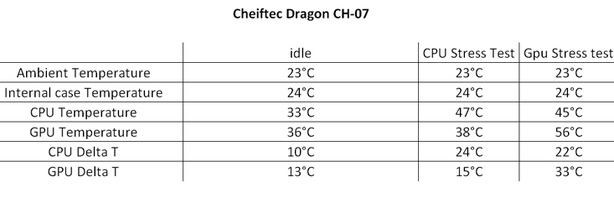
-
SilverStone FT01
-
Cooler Master HAF 932
-
Cooler Master Sniper
-
Hiper Osiris
-
Antec Nine Hundred Two (Full Speed)
-
Chieftec Dragon CH-07
-
Lian Li Tyr PC-X2000
-
Lian Li PC-P50
-
Lian Li PC-9
-
Akasa Infiniti ZOR
-
Antec Nine Hundred Two (Low Speed)
-
Akasa Omega
-
Cooler Master ATCS 840
-
Lancool K7 Metal Boned
°C
-
Antec Nine Hundred Two (Full Speed)
-
Lian Li Tyr PC-X2000
-
Cooler Master HAF 932
-
Chieftec Dragon CH-07
-
Lian Li PC-P50
-
Antec Nine Hundred Two (Low Speed)
-
Cooler Master ATCS 840
-
Hiper Osiris
-
Akasa Omega
-
Lancool K7 Metal Boned
-
Cooler Master Sniper
-
SilverStone FT01
-
Lian LI PC-9
-
Akasa Infiniti ZOR
°C
-
Cooler Master HAF 932
-
Cooler Master Sniper
-
Lian Li PC-P50
-
SilverStone FT01
-
Cheiftec Dragon
-
Antec Nine Hundred Two (Full Speed)
-
Antec Nine Hundred Two (Low Speed)
-
Akasa Infiniti ZOR
-
Hiper Osiris
-
Cooler Master ATCS 840
-
Lian Li PC-9
-
Akasa Omega
-
Lian Li Tyr PC-X2000
-
Lancool K7 Metal Boned
°C










Want to comment? Please log in.